Skip to content
SKU: RM02A Category: Brand:

reMarkable Paper Pro With Marker Plus

0 Reviews
In stock
  • 11.8-inch Canvas Color Display
  • Custom reMarkable OS (Linux-based)
  • Adjustable Built-in Reading Light
  • Marker Plus with Built-in Eraser
  • 64GB Internal Storage & 2GB RAM
  • Up to 14 Days Battery Life (5030 mAh)
  • Wi-Fi 2.4 GHz and 5 GHz Connectivity
  • Sub-1ms Pen-to-Ink Latency
  • 9 Digital Writing Tools & Colors
  • On-Device Data Encryption
  • Prices and offers are subject to change without notice.

Price range: KSh 100,000 through KSh 121,000

GENUINE 100% Original
M-PESA Secure Pay
WARRANTY NO LOCAL
SUPPORT Expert Help
Brand:

Product details

reMarkable Paper Pro Price in Kenya

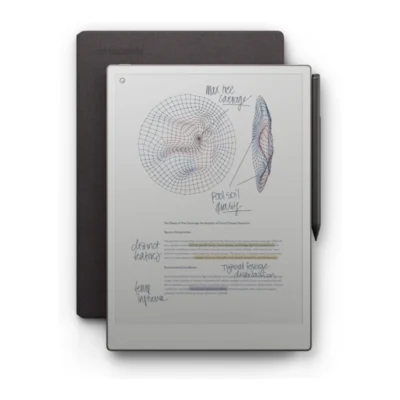
The reMarkable Paper Pro With Marker Plus price in Kenya is Ksh 100,000. This premium investment completely replaces heavy, disorganized notebooks with the ultimate 11.8-inch color digital paper tablet. You gain the unmatched physical feel of writing on real paper combined with brilliant digital color. This flagship device justifies its cost by massively streamlining your professional workflow and killing desk clutter forever. The Canvas Color display introduces millions of microscopic color ink particles directly to the screen. You can organize thoughts, highlight legal contracts, and sketch diagrams in nine vibrant colors. The generous 64GB internal drive stores thousands of heavy PDF files, ebooks, and custom notebooks instantly. The custom Linux-based operating system actively blocks all internet distractions to force deep, highly productive work sessions.

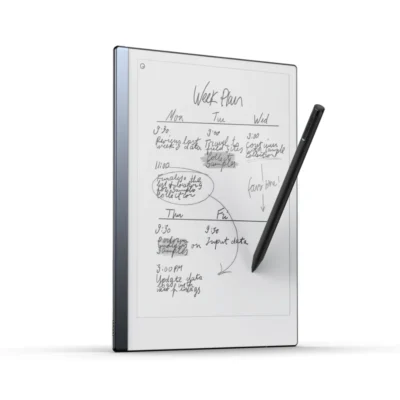
An adjustable reading light lets you review documents comfortably at night without blasting harsh blue light into your eyes. The ultra-slim chassis packs a massive 5,030 mAh battery inside. This extreme efficiency delivers up to 14 days of regular use without ever hunting for a wall socket. Stop losing crucial meeting notes inside scattered, half-empty paper notebooks. You can visually color-code your daily plans and instantly search through your handwritten thoughts by keyword. Buy the original reMarkable Paper Pro today at Exelic Gadgets, located at Mithoo Biashara Centre. Secure your purchase safely via our verified M-Pesa till number. We guarantee fast, same-day delivery right to your desk anywhere in Nairobi. Customers outside the capital receive rapid, fully insured countrywide shipping via Wells Fargo or G4S.

Why You’ll Love It (The Lifestyle Upgrade)

  • Visual Organization: The Canvas Color display lets you highlight legal documents in red and green, ensuring you instantly spot critical clauses during boardroom meetings.
  • Nighttime Productivity: The adjustable reading light provides subtle illumination, allowing you to review contracts in bed without keeping your partner awake.
  • Frictionless Corrections: The premium Marker Plus features a dedicated tail eraser, meaning you can rub out drafting mistakes intuitively just like a classic pencil.
  • Massive Storage Capacity: The 64GB internal drive holds thousands of PDFs and ebooks, freeing up physical space in your heavy leather briefcase.
  • Marathon Battery Life: A massive 5,030 mAh battery delivers up to two weeks of continuous use, giving you total peace of mind during extended business trips.
  • Distraction-Free Focus: The custom operating system actively blocks notifications and web browsers, keeping your brain locked into deep, productive work.

reMarkable Paper Pro Specifications

Feature Details
Price in Kenya Ksh 100,000
Display Technology 11.8-inch Canvas Color (E Ink Gallery 3)
Screen Resolution 2160 x 1620 (229 ppi)
Processor 1.8 GHz quad-core Cortex-A53
Memory & Storage 2 GB RAM / 64 GB Internal
Battery Capacity 5,030 mAh Li-ion
Battery Life Up to 14 days (regular use)
Reading Light Adjustable, low-glare illumination
Stylus Included Marker Plus (with physical eraser)
Operating System Custom reMarkable OS
Dimensions 274.1 x 196.6 x 5.1 mm
Weight 525 g (1.16 lb)
Charging Interface USB-C
Document Support PDF, EPUB, PNG, SVG
Connectivity Wi-Fi (2.4 GHz / 5 GHz)

Deep Dive: The Tech Explained

11.8-Inch Canvas Color Display

Reading dense black-and-white documents gets incredibly boring over time. The Paper Pro solves this by introducing a brilliant 11.8-inch Canvas Color display powered by advanced E Ink Gallery 3 technology. It physically moves millions of microscopic color ink particles right beneath the screen surface. This creates vibrant hues and natural tones without using glowing LCD pixels. You can highlight important financial figures in bright yellow or draft architectural floor plans using red ink. It acts exactly like using a fresh pack of colored pens on premium A4 paper. The matte texture provides satisfying physical friction against the stylus. The generous screen size perfectly matches a standard physical notebook. You do not have to constantly zoom in and pan around to read standard PDF reports. Your eyes stay completely relaxed even after reviewing documents for several consecutive hours. It fundamentally changes how you process visual information daily.

Adjustable Front-Lit Reading Light

Older e-ink tablets became completely useless the moment the sun went down. This flagship device fixes that severe limitation with a highly subtle, built-in reading light. It gently reflects soft light off the display surface instead of shooting harsh beams directly into your eyes. You can comfortably read lengthy corporate reports late at night in your Kileleshwa apartment. You control the brightness easily to match your immediate environment perfectly. It functions exactly like a premium bedside reading lamp that never causes tension headaches. The glow stays incredibly even across the entire 11.8-inch glass panel. You maintain your focused workflow during late-evening flights or sudden KPLC blackouts. The screen remains completely glare-free even under the blinding midday Nairobi sun. It gives you absolute freedom to work efficiently regardless of the physical lighting conditions around you. The color particles still pop vibrantly even when relying entirely on the internal illumination.

Marker Plus and Sub-Millimeter Latency

Digital handwriting often feels sluggish and frustratingly disconnected from your physical hand movements. The engineering team eliminated this delay by pushing the pen-to-ink distance to less than a single millimeter. The digital ink flows onto the screen the exact microsecond your stylus touches the glass. It feels instantaneous and completely natural. The included Marker Plus features a highly precise eraser built directly into the tail end. You simply flip the pen upside down to rub out mistakes just like a classic HB pencil. This intuitive physical action keeps your creative thoughts flowing smoothly. It requires absolutely no Bluetooth pairing or complex charging routines. The pen snaps magnetically to the metal chassis so it never gets lost in your laptop bag. It also detects tilt and pressure perfectly. Pressing harder gives you a thicker line, making your digital signature look incredibly authentic. You master the nine different writing tools instantly.

Distraction-Free Custom Operating System

Modern tablets constantly ruin your concentration with endless email alerts and social media pop-ups. The custom reMarkable OS deliberately strips away all these annoying digital distractions. It operates as a completely silent, secure digital sanctuary for your deepest thoughts. There is no web browser to tempt you when you should be working. You focus purely on the blank page in front of you. Think of it as stepping into a quiet, soundproof library hidden far away from the noisy Mombasa Road traffic. You process complex ideas and draft massive business proposals much faster. The software organizes your work seamlessly into dedicated folders and tags. You can instantly search through your handwritten notes to find a specific client’s name. It translates your messy cursive into clean, typed digital text with a single tap. You get maximum professional output without the mental fatigue of constant notifications.

14-Day Marathon Battery Life

Charging another smart device every single night is an exhausting modern chore. The massive 5,030 mAh internal battery in this tablet changes the charging rules entirely. You get an astonishing two weeks of regular daily use from one single charge. This extreme efficiency comes from the low-power color e-ink display. You can leave your charging cable at home during a week-long business trip to Kisumu. It acts exactly like a traditional paper notebook that never suddenly dies on you during a crucial boardroom meeting. The standby mode holds power for up to 90 full days. When the battery finally runs low, the standard USB-C port tops it back up quickly. You spend significantly less time tethered to a wall socket. This reliability ensures your critical notes are always accessible precisely when you need them. You never suffer the panic of a dead screen before a major presentation.

Professional Cloud Synchronization

Keeping physical notebooks organized across different office locations is practically impossible. This device automatically backs up every single page you write directly to the secure cloud. It acts exactly like an invisible digital assistant instantly copying your work to a highly secure vault. You can access your handwritten meeting minutes from your smartphone or Mac using the companion app. The tablet supports seamless integration with Google Drive, Dropbox, and Microsoft OneDrive. You easily pull complex PDF contracts down from the cloud, sign them in blue ink, and email them straight back. It completely eliminates the need for bulky office printers and scanners. On-device encryption guarantees your sensitive corporate data stays entirely private. You can also lock the screen with a secure numerical passcode for absolute peace of mind. You can even cast your tablet screen live to a boardroom projector during collaborative team meetings.

Alternatives & Competitors

Frequently Asked Questions (FAQs)

  • Does the reMarkable Paper Pro screen emit blue light? No. It uses an eye-friendly, front-lit system that reflects soft light across the e-ink surface rather than directly into your eyes.
  • Can I watch YouTube or browse the web? No. The software is intentionally designed without a browser to maintain a completely distraction-free workspace.
  • Does the Marker Plus need to be charged? No. The stylus operates entirely battery-free and is always ready to write the exact moment you pick it up.
  • Is the included storage space expandable via MicroSD? No. The 64GB internal drive is fixed but provides massive space for thousands of heavy documents and templates.
  • Can it convert my messy handwriting into typed text? Yes. The built-in software translates your handwritten notes into editable digital text with a single screen tap.
  • Does the price include the Marker Plus? Yes. This specific bundle includes the flagship Marker Plus featuring the built-in tail eraser.
  • Will it work in completely dark rooms? Yes. The adjustable reading light allows you to read and write comfortably in pitch-black environments.

Buy the latest reMarkable Tablets in Kenya at Exelic Gadgets.
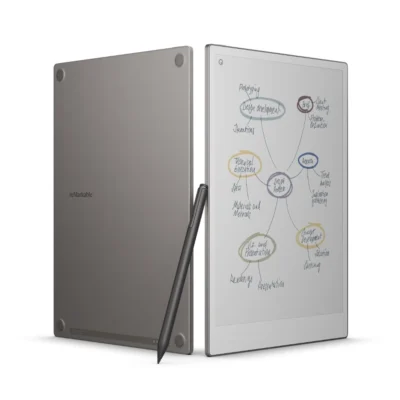
Compare reMarkable Paper Pro With Marker Plus with Similar Products

Compare reMarkable Paper Pro With Marker Plus specs, features and price with similar tablets and alternatives.

Compare reMarkable Paper Pro With Marker Plus with Similar Products

General

General specifications comparison
SpecificationreMarkable Paper Pro With Marker PlusreMarkable Paper Pro Marker Plus + Book FolioreMarkable Paper Pro Move With Marker PlusreMarkable 2 With Marker Plus
BrandreMarkablereMarkablereMarkablereMarkable
ModelreMarkable Paper ProPaper Pro with Marker Plus and Book FolioreMarkable Paper Pro MovereMarkable 2
AnnouncedSeptember 2024September 2024September 2025August 2020
ConnectivityMobile network: No cellular connectivity; Wi-Fi: Wi-Fi 2.4 GHz and 5 GHz; Bluetooth: Bluetooth 5.0; USB: USB 2.0 Type-CMobile network: Wi-Fi only; Wi-Fi: Dual-band Wi-Fi 2.4 GHz and 5 GHz; Bluetooth: No user-facing Bluetooth connectivity; USB: USB-CMobile network: No cellular connectivity; Wi-Fi: Wi-Fi 2.4 GHz and 5 GHz; Bluetooth: Bluetooth 5.0; USB: USB 2.0 high-speed Type-CMobile network: No cellular connectivity; Wi-Fi: Wi-Fi 2.4 GHz and 5 GHz; Bluetooth: No; USB: USB-C; accessory port

Design

Design specifications comparison
SpecificationreMarkable Paper Pro With Marker PlusreMarkable Paper Pro Marker Plus + Book FolioreMarkable Paper Pro Move With Marker PlusreMarkable 2 With Marker Plus
Dimensions274.1 × 196.6 × 5.1 mm274.1 x 196.6 x 5.1 mm195.6 × 107.8 × 6.5 mm246 × 188 × 4.7 mm
WeightApproximately 525 gApproximately 525 g (tablet)230 g403.5 g
Build materialsAnodized aluminium chassis with textured writing surfaceAnodized aluminum body; glass-front E Ink displayAluminium unibody with textured writing surfaceAluminium unibody with textured writing surface

Display

Display specifications comparison
SpecificationreMarkable Paper Pro With Marker PlusreMarkable Paper Pro Marker Plus + Book FolioreMarkable Paper Pro Move With Marker PlusreMarkable 2 With Marker Plus
Display11.8-inch Canvas Color digital paper display (E Ink Gallery 3)11.8-inch Canvas Color display based on E Ink Gallery 37.3-inch Canvas Color digital paper display (E Ink Gallery 3)10.3-inch second-generation Canvas monochrome digital paper display
Screen resolution2160 × 1620 pixels (229 ppi)2160 x 1620 pixels, 229 ppi1696 × 954 pixels (264 ppi)1872 × 1404 pixels (226 ppi)
Display featuresAdjustable reading light; multi-point capacitive touch; up to 20,000 colors; textured paper-like surface; palm rejectionColor E Ink, 4:3 aspect ratio, adjustable reading light, palm rejectionAdjustable reading light; multi-point capacitive touch; full-color support; textured paper-like surface; palm rejectionMulti-point capacitive touch; sunlight-readable; no reading light
Writing surfaceTextured color-paper display designed for paper-like writingNot specifiedTextured color-paper display designed for paper-like writingNot specified

Performance

Performance specifications comparison
SpecificationreMarkable Paper Pro With Marker PlusreMarkable Paper Pro Marker Plus + Book FolioreMarkable Paper Pro Move With Marker PlusreMarkable 2 With Marker Plus
Processor1.8 GHz quad-core processor1.8 GHz quad-core ARM Cortex-A531.7 GHz dual-core processor1.2 GHz dual-core ARM
CPUQuad-core Arm Cortex-A53Quad-core ARM Cortex-A53 at 1.8 GHzDual-core Arm Cortex-A551.2 GHz dual-core ARM

Memory & Storage

Memory & Storage specifications comparison
SpecificationreMarkable Paper Pro With Marker PlusreMarkable Paper Pro Marker Plus + Book FolioreMarkable Paper Pro Move With Marker PlusreMarkable 2 With Marker Plus
RAM2 GB LPDDR42 GB LPDDR42 GB LPDDR4X1 GB LPDDR3 SDRAM
Storage64 GB internal storage64 GB64 GB internal storage8 GB internal storage (about 6.5 GB available after OS)
Storage technologyInternal flash storageFlash storageNot specifiedInternal flash storage
Expandable storageNo memory card slotNoNot specifiedNo memory card slot

Battery & Charging

Battery & Charging specifications comparison
SpecificationreMarkable Paper Pro With Marker PlusreMarkable Paper Pro Marker Plus + Book FolioreMarkable Paper Pro Move With Marker PlusreMarkable 2 With Marker Plus
BatteryBuilt-in rechargeable 5030 mAh Li-ion; up to 14 days regular use; up to 90 days standby5,030 mAh rechargeable lithium-ion; up to 14 days regular useBuilt-in rechargeable 2334 mAh Li-ion; up to 14 days regular useBuilt-in rechargeable 3000 mAh Li-ion; up to 14 days regular use; up to 90 days standby
ChargingUSB-C; 0–90% in approximately 90 minutesUSB-CUSB-C; 0–90% in under 45 minutesUSB-C; recommended charger up to 5 V / 1.5 A

Software

Software specifications comparison
SpecificationreMarkable Paper Pro With Marker PlusreMarkable Paper Pro Marker Plus + Book FolioreMarkable Paper Pro Move With Marker PlusreMarkable 2 With Marker Plus
Operating systemreMarkable OS (custom Linux-based operating system)reMarkable OS (Linux based)reMarkable OS (custom Linux-based operating system)reMarkable OS (custom Linux-based operating system)

Network

Network specifications comparison
SpecificationreMarkable Paper Pro With Marker PlusreMarkable Paper Pro Marker Plus + Book FolioreMarkable Paper Pro Move With Marker PlusreMarkable 2 With Marker Plus
NetworkNo cellular connectivityWi-Fi onlyNo cellular connectivityNo cellular connectivity

Connectivity

Connectivity specifications comparison
SpecificationreMarkable Paper Pro With Marker PlusreMarkable Paper Pro Marker Plus + Book FolioreMarkable Paper Pro Move With Marker PlusreMarkable 2 With Marker Plus
NFCNoNoNoNo
BluetoothBluetooth 5.0No user-facing Bluetooth connectivityBluetooth 5.0No
Wi-FiWi-Fi 2.4 GHz and 5 GHzDual-band Wi-Fi 2.4 GHz and 5 GHzWi-Fi 2.4 GHz and 5 GHzWi-Fi 2.4 GHz and 5 GHz
PositioningNo GPSNo GPS or GNSSNo GPSNo GPS
USBUSB 2.0 Type-CUSB-CUSB 2.0 high-speed Type-CUSB-C; accessory port

Durability

Durability specifications comparison
SpecificationreMarkable Paper Pro With Marker PlusreMarkable Paper Pro Marker Plus + Book FolioreMarkable Paper Pro Move With Marker PlusreMarkable 2 With Marker Plus
Water resistanceNot specifiedNot specifiedNot specifiedNo official water-resistance rating published by reMarkable

Features

Features specifications comparison
SpecificationreMarkable Paper Pro With Marker PlusreMarkable Paper Pro Marker Plus + Book FolioreMarkable Paper Pro Move With Marker PlusreMarkable 2 With Marker Plus
SensorsFolio open/close sensorCapacitive touch and Marker input with palm rejectionAuto wake/sleep sensorNot specified
ColorsGrayTablet: white/aluminum; Book Folio color varies by bundleNot specifiedWhite and aluminum

Audio

Audio specifications comparison
SpecificationreMarkable Paper Pro With Marker PlusreMarkable Paper Pro Marker Plus + Book FolioreMarkable Paper Pro Move With Marker PlusreMarkable 2 With Marker Plus
LoudspeakersNoNoNot specifiedNo
3.5 mm headphone jackNoNoNot specifiedNo

Stylus & writing

Stylus & writing specifications comparison
SpecificationreMarkable Paper Pro With Marker PlusreMarkable Paper Pro Marker Plus + Book FolioreMarkable Paper Pro Move With Marker PlusreMarkable 2 With Marker Plus
StylusMarker Plus; battery-free active stylus; no charging or pairing requiredNot specifiedMarker Plus; battery-free EMR; no charging or pairing requiredMarker Plus; battery-free EMR; no charging, setup or pairing required
Writing performance4,096 pressure levels; tilt detection; built-in eraser; approximately 12 ms writing latency; palm rejectionNot specified4,096 pressure levels; tilt detection; built-in eraser; approximately 12 ms writing latency; palm rejection4,096 pressure levels; tilt detection; built-in eraser; approximately 21 ms writing latency; palm rejection
Writing surfaceNot specifiedNot specifiedNot specifiedTextured paper-like surface; sunlight-readable monochrome digital paper

Software & files

Software & files specifications comparison
SpecificationreMarkable Paper Pro With Marker PlusreMarkable Paper Pro Marker Plus + Book FolioreMarkable Paper Pro Move With Marker PlusreMarkable 2 With Marker Plus
Document supportImport PDF and EPUB; export PDF, PNG and SVGNot specifiedImport PDF and EPUB; export PDF, PNG and SVGImport PDF and EPUB; export PDF, PNG and SVG
Productivity featuresHandwriting-to-text conversion; reMarkable Cloud sync; companion apps for macOS, Windows, iOS and Android; integrations and live screen sharingNot specifiedHandwriting-to-text conversion; reMarkable Cloud sync; companion apps for macOS, Windows, iOS and Android; Google Drive, OneDrive and Dropbox importHandwriting-to-text conversion powered by MyScript; reMarkable Cloud sync; companion apps for macOS, Windows, iOS and Android

Security

Security specifications comparison
SpecificationreMarkable Paper Pro With Marker PlusreMarkable Paper Pro Marker Plus + Book FolioreMarkable Paper Pro Move With Marker PlusreMarkable 2 With Marker Plus
Data protectionEncryption in transit and at rest; optional on-device encryption; passcode and multifactor authentication supportDevice passcode; secure cloud syncDevice passcode; secure cloud syncDevice passcode; secure cloud sync

In the box

In the box specifications comparison
SpecificationreMarkable Paper Pro With Marker PlusreMarkable Paper Pro Marker Plus + Book FolioreMarkable Paper Pro Move With Marker PlusreMarkable 2 With Marker Plus
Included itemsreMarkable Paper Pro; Marker Plus; six replacement Marker tips; USB-C charging cablereMarkable Paper Pro, Marker Plus, Book Folio, USB-C cablereMarkable Paper Pro Move; Marker Plus; 1 m USB-C cable; six replacement Marker tipsreMarkable 2; Marker Plus; 1 m USB-A to USB-C charging cable; nine replacement Marker tips

Input

Input specifications comparison
SpecificationreMarkable Paper Pro With Marker PlusreMarkable Paper Pro Marker Plus + Book FolioreMarkable Paper Pro Move With Marker PlusreMarkable 2 With Marker Plus
StylusNot specifiedMarker Plus included; pressure-sensitive digital pen with built-in eraserNot specifiedNot specified
Writing performanceNot specifiedLow-latency handwriting with 4,096 pressure levelsNot specifiedNot specified

Documents

Documents specifications comparison
SpecificationreMarkable Paper Pro With Marker PlusreMarkable Paper Pro Marker Plus + Book FolioreMarkable Paper Pro Move With Marker PlusreMarkable 2 With Marker Plus
Document supportNot specifiedPDF and EPUB; annotate PDFs and e-booksNot specifiedNot specified

Productivity

Productivity specifications comparison
SpecificationreMarkable Paper Pro With Marker PlusreMarkable Paper Pro Marker Plus + Book FolioreMarkable Paper Pro Move With Marker PlusreMarkable 2 With Marker Plus
Productivity featuresNot specifiedHandwriting conversion; cloud sync; screen share; templates; tagsNot specifiedNot specified

Specs

reMarkable Paper Pro With Marker Plus specifications

General

reMarkable Paper Pro With Marker Plus — General
BrandreMarkable
ModelreMarkable Paper Pro
AnnouncedSeptember 2024

Design

reMarkable Paper Pro With Marker Plus — Design
Dimensions274.1 × 196.6 × 5.1 mm
WeightApproximately 525 g
Build materialsAnodized aluminium chassis with textured writing surface

Display

reMarkable Paper Pro With Marker Plus — Display
Display11.8-inch Canvas Color digital paper display (E Ink Gallery 3)
Screen resolution2160 × 1620 pixels (229 ppi)
Display featuresAdjustable reading light; multi-point capacitive touch; up to 20,000 colors; textured paper-like surface; palm rejection
Writing surfaceTextured color-paper display designed for paper-like writing

Performance

reMarkable Paper Pro With Marker Plus — Performance
Processor1.8 GHz quad-core processor
CPUQuad-core Arm Cortex-A53

Memory & Storage

reMarkable Paper Pro With Marker Plus — Memory & Storage
RAM2 GB LPDDR4
Storage64 GB internal storage
Storage technologyInternal flash storage
Expandable storageNo memory card slot

Battery & Charging

reMarkable Paper Pro With Marker Plus — Battery & Charging
BatteryBuilt-in rechargeable 5030 mAh Li-ion; up to 14 days regular use; up to 90 days standby
ChargingUSB-C; 0–90% in approximately 90 minutes

Software

reMarkable Paper Pro With Marker Plus — Software
Operating systemreMarkable OS (custom Linux-based operating system)

Network

reMarkable Paper Pro With Marker Plus — Network
NetworkNo cellular connectivity

Connectivity

reMarkable Paper Pro With Marker Plus — Connectivity
NFCNo
BluetoothBluetooth 5.0
Wi-FiWi-Fi 2.4 GHz and 5 GHz
PositioningNo GPS
USBUSB 2.0 Type-C

Features

reMarkable Paper Pro With Marker Plus — Features
SensorsFolio open/close sensor
ColorsGray

Audio

reMarkable Paper Pro With Marker Plus — Audio
LoudspeakersNo
3.5 mm headphone jackNo

Stylus & writing

reMarkable Paper Pro With Marker Plus — Stylus & writing
StylusMarker Plus; battery-free active stylus; no charging or pairing required
Writing performance4,096 pressure levels; tilt detection; built-in eraser; approximately 12 ms writing latency; palm rejection

Software & files

reMarkable Paper Pro With Marker Plus — Software & files
Document supportImport PDF and EPUB; export PDF, PNG and SVG
Productivity featuresHandwriting-to-text conversion; reMarkable Cloud sync; companion apps for macOS, Windows, iOS and Android; integrations and live screen sharing

Security

reMarkable Paper Pro With Marker Plus — Security
Data protectionEncryption in transit and at rest; optional on-device encryption; passcode and multifactor authentication support

In the box

reMarkable Paper Pro With Marker Plus — In the box
Included itemsreMarkable Paper Pro; Marker Plus; six replacement Marker tips; USB-C charging cable

0 Reviews

No reviews yet

Be the first to review reMarkable Paper Pro With Marker Plus.

Write a review
Back to Top

My Cart