Razer Leviathan V2 Gaming Soundbar With Subwoofer
- Mains-powered product.
- 65 W rated output.
- Works with the Razer Synapse 3 Razer Audio app.
- Weighs 1.4 kg.

Speaker comparison
Compare sound, battery life, durability and connections.
01Selected 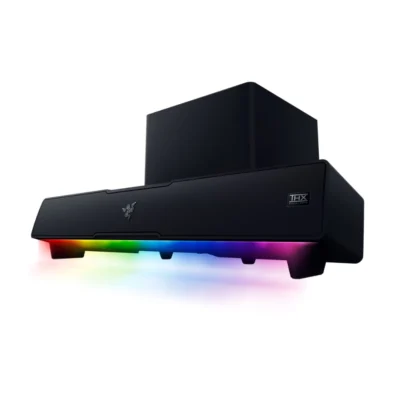 Razer Leviathan V2 Gaming Soundbar With Subwoofer
KSh 46,500In Stock | 02  Apple HomeView
KSh 41,300Out of Stock |
|---|
The Apple HomeView is the better buy: it is lighter (952 g).
The main differences to help you choose.
| Priority | Razer Leviathan V2 Gaming Soundbar With Subwoofer | Apple HomeView |
|---|---|---|
| Portability | 1.4 kg | 952 g |
| Output power | 65 W rated output | Wired power |
Tick a topic above to see how each product answers it.
Explore the full specifications, section by section.
| Specification | Razer Leviathan V2 Gaming Soundbar With Subwoofer | Apple HomeView |
|---|---|---|
| Brand | Razer | Apple |
| Model | Leviathan V2 | HomeView |
| Type | Soundbar with Subwoofer | — |
| Color | Black | — |
| Product type | — | Smart display and home hub (tabletop model) |
| Specification | Razer Leviathan V2 Gaming Soundbar With Subwoofer | Apple HomeView |
|---|---|---|
| Dimensions | Soundbar: 500 × 91.3 × 84 mm; subwoofer: 220 × 220 × 241.5 mm | 145.5 mm width; 136.7–173.2 mm height and 96.0–130.2 mm depth depending on tilt |
| Weight | Soundbar: 1.4 kg; subwoofer: 3.0 kg | 952 g |
| Specification | Razer Leviathan V2 Gaming Soundbar With Subwoofer | Apple HomeView |
|---|---|---|
| Battery | Mains-powered product | — |
| Specification | Razer Leviathan V2 Gaming Soundbar With Subwoofer | Apple HomeView |
|---|---|---|
| Network connection | — | Wi-Fi 6E (802.11ax) with MIMO, simultaneous dual band; Bluetooth 6.0 |
| Specification | Razer Leviathan V2 Gaming Soundbar With Subwoofer | Apple HomeView |
|---|---|---|
| Bluetooth | Bluetooth 5.2 (60 ms low latency) | — |
| Bluetooth Profiles / Codecs | SBC; AAC | — |
| Wired Inputs | USB Type-C audio input to PC; subwoofer output | — |
| USB | USB Type-C audio input to PC | — |
| Microphone / Guitar Inputs | No microphone or guitar input | — |
| App Support | Razer Synapse 3; Razer Audio app; Razer Chroma RGB app | — |
| Specification | Razer Leviathan V2 Gaming Soundbar With Subwoofer | Apple HomeView |
|---|---|---|
| Lightshow | Razer Chroma RGB, 18 zones; Breathing, Spectrum Cycling, Static, and Wave effects | — |
| Party Features | Not a party-speaker product | — |
| Home Cinema Features | THX Spatial Audio (PC via Synapse 3); 7.1 surround simulation | — |
| Special Features | Low-latency Bluetooth; custom 10-band EQ; headphone quick toggle | — |
| Specification | Razer Leviathan V2 Gaming Soundbar With Subwoofer | Apple HomeView |
|---|---|---|
| Speaker Configuration | 2.1-channel soundbar and subwoofer | — |
| Drivers | Full-range: 2 × 2.0 × 4.0 in (48 × 95 mm); tweeters: 2 × 0.75 in (20 mm); passive radiators: 2 × 1.7 × 5.3 in (43 × 135 mm); down-firing subwoofer: 1 × 5.5 in (140 mm) | — |
| Frequency Response | 45 Hz – 20 kHz | — |
| Total Power Output | 65 W | — |
| Audio Channels | 2.1 | — |
| Sound Modes / EQ | Custom 10-band EQ via Razer Synapse/Razer Audio app; THX Spatial Audio | — |
| Audio Features | THX Spatial Audio; Razer Chroma RGB; low-latency Bluetooth 5.2 | — |
| Specification | Razer Leviathan V2 Gaming Soundbar With Subwoofer | Apple HomeView |
|---|---|---|
| Power Source | External 65 W power adapter | — |
| Battery Life | Mains-powered product | — |
| Power Consumption | External 65 W input power | — |
| Specification | Razer Leviathan V2 Gaming Soundbar With Subwoofer | Apple HomeView |
|---|---|---|
| Controls | Source, Bluetooth, power and volume buttons; headphone quick toggle | — |
| Placement / Mounting | Desktop placement; detachable rubber feet/raised feet | — |
| Specification | Razer Leviathan V2 Gaming Soundbar With Subwoofer | Apple HomeView |
|---|---|---|
| Speaker / Soundbar | 1 × Razer Leviathan V2 soundbar | — |
| Subwoofer | 1 × Razer Leviathan V2 subwoofer | — |
| Power Cable | External 65 W power adapter | — |
| Audio / HDMI Cable | USB-C to USB-A cable | — |
| Mounting Accessories | Flat feet and raised feet for soundbar angle adjustment | — |
| Other Accessories | Raised feet | — |
| Documentation | Important Product Information Guide | — |
| Specification | Razer Leviathan V2 Gaming Soundbar With Subwoofer | Apple HomeView |
|---|---|---|
| Compatible cameras and sensors | — | Apple Home and Matter accessories; compatible cameras and sensors |
| Device capacity | — | Up to six recognized users; up to nine simultaneous camera feeds |
| Supported protocols | — | Thread, Matter and Apple Home |
| Automation | — | Scenes, schedules and voice-controlled routines |
| Detection features | — | Face recognition; smoke and carbon monoxide alarm Sound Recognition |
| Alarm and notifications | — | Alerts on compatible iPhone, iPad and Apple Watch |
| Specification | Razer Leviathan V2 Gaming Soundbar With Subwoofer | Apple HomeView |
|---|---|---|
| Ports | — | USB-C power connector |
| App compatibility | — | Home, FaceTime, Messages, Music, Calendar, Reminders, Find My, Safari and more |
| Subscription requirements | — | Some media and HomeKit Secure Video features require subscriptions; compatible accessories sold separately |
| Privacy and security | — | A18 Secure Exclaves; personal content separated by user; Private Cloud Compute |
| Specification | Razer Leviathan V2 Gaming Soundbar With Subwoofer | Apple HomeView |
|---|---|---|
| Power requirements | — | Wired power; included 30W adapter, 100–240V AC, 50–60Hz |
| Specification | Razer Leviathan V2 Gaming Soundbar With Subwoofer | Apple HomeView |
|---|---|---|
| In the box | — | HomeView, 1.5 m USB-C cable, 30W adapter and documentation |
| Specification | Razer Leviathan V2 Gaming Soundbar With Subwoofer | Apple HomeView |
|---|---|---|
| Display | — | 7-inch IPS Liquid Retina; 1088 × 1088 pixels, 220 ppiSection: Display and camera |
| Brightness | — | 0.3–500 nitsSection: Display and camera |
| Display Features | — | True Tone; oleophobic coating; proximity-responsive interfaceSection: Display and camera |
| Camera | — | 12MP, f/2.4; Center StageSection: Display and camera |
| Video And Audio Calls | — | FaceTime over Wi-FiSection: Display and camera |
| Specification | Razer Leviathan V2 Gaming Soundbar With Subwoofer | Apple HomeView |
|---|---|---|
| Chip | — | Apple A18Section: Audio and intelligence |
| Speakers | — | Two full-range drivers, down-firing woofer and two force-cancelling passive radiatorsSection: Audio and intelligence |
| Audio | — | Spatial Audio with Dolby Atmos; computational audio; AirPlay multiroomSection: Audio and intelligence |
| Microphones | — | Four beamforming microphonesSection: Audio and intelligence |
| Assistant | — | Siri AI with Apple IntelligenceSection: Audio and intelligence |
| Sensors | — | Ambient light, temperature and humidity, accelerometerSection: Audio and intelligence |
| Colours | — | Silver, Starlight, Rose Pink and Space GraySection: Audio and intelligence |
| Setup Requirements | — | iPhone with iOS 27.2 or later or iPad with iPadOS 27.2 or later; Wi-Fi internetSection: Audio and intelligence |
These products have the same published specifications.
The Apple HomeView is the better buy for almost everyone, with a lighter build.
Back to compared products ↑Razer Leviathan V2 Gaming Soundbar With SubwooferVSHarman Kardon SoundSticks 5JBL Bar 2.1 Deep Bass MK2 | 300WVSRazer Leviathan V2 Gaming Soundbar With SubwooferSony HT-S500RF | 1000WVSRazer Leviathan V2 Gaming Soundbar With SubwooferSony HT-S40R | 600WVSRazer Leviathan V2 Gaming Soundbar With SubwooferSoundcore Rave 3SVSRazer Leviathan V2 Gaming Soundbar With SubwooferMarshall Woburn III Bluetooth SpeakerVSRazer Leviathan V2 Gaming Soundbar With SubwooferWe are here to serve you
Keep a link to this cart, or ask us to send it to you. Reminders are optional.
You may send me reminders about this cart on the channels I select. I can opt out at any time.
Only the details you provide here or in checkout are used. Reminders are optional. Privacy notice