

Product details
Logitech K400 Plus Wireless Touch Keyboard Price in Kenya
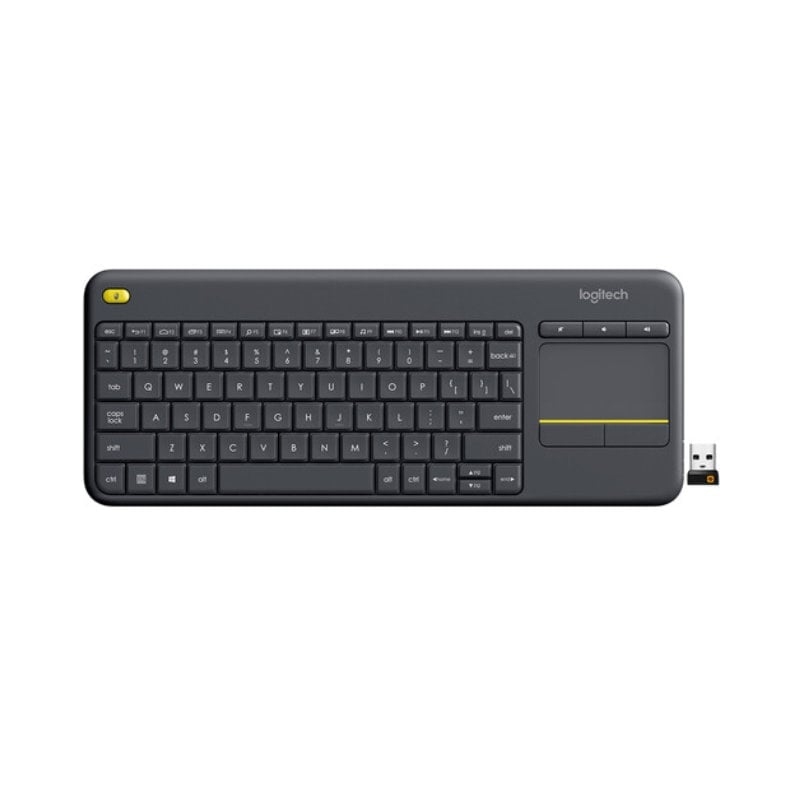
The Logitech K400 Plus price in Kenya is Ksh 5,100. This isn’t your standard desktop keyboard—it is the ultimate “couch commander.” Designed specifically for home entertainment and HTPC (Home Theater PC) setups, the K400 Plus eliminates the need for a separate mouse by integrating a large 3.5-inch touchpad directly into the right side of the keyboard.
Whether you are navigating Netflix from your sofa, searching YouTube on your Smart TV, or managing a presentation from across the room, the K400 Plus offers a seamless, all-in-one experience. It features ultra-silent keys that are nearly inaudible, making it perfect for late-night browsing without disturbing the household.
Despite its compact, space-saving design, it retains a familiar full-size typing layout and dedicated media hotkeys for instant volume control and navigation. With its robust 18-month battery life and a stable 10-meter wireless range, the K400 Plus turns your living room into a high-tech hub with zero cable clutter.
Relax and take control. Navigate your digital world from the comfort of your couch. Buy the Logitech K400 Plus at Exelic Gadgets today for same-day delivery in Nairobi or secure nationwide shipping via Wells Fargo/G4S.
Why You’ll Love It
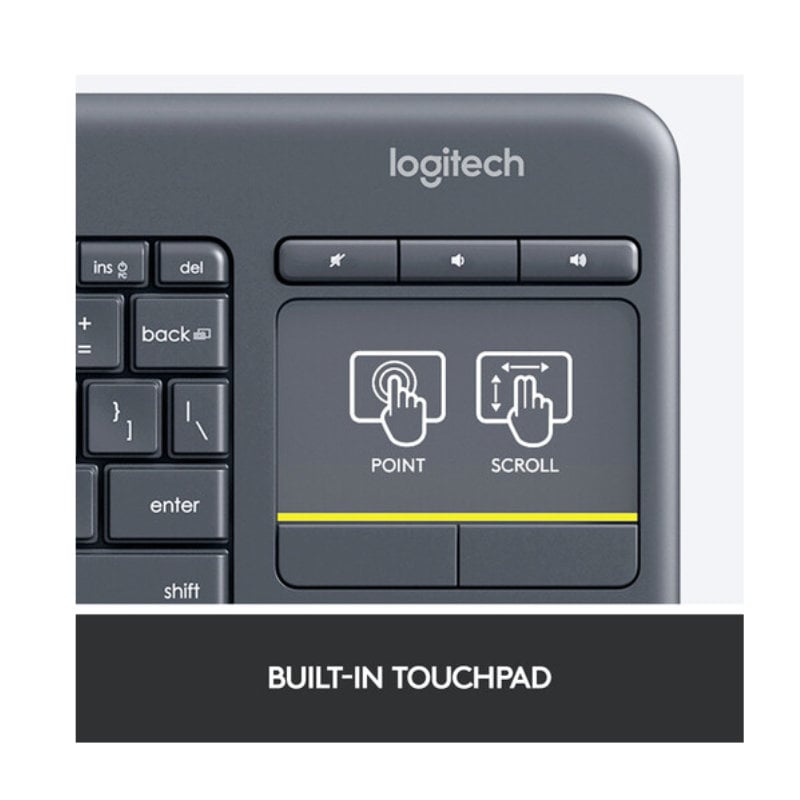
- Built-in 3.5″ Touchpad: Combines a keyboard and mouse into one device, so that you don’t need a flat surface or a mousepad to navigate your screen.
- 10-Meter Wireless Freedom: Features a powerful, lag-free 2.4 GHz connection, so that you can control your TV-connected PC from any corner of the room.
- Dedicated Media Keys: Volume up, volume down, and mute buttons are placed right above the touchpad, so that you have instant control over your audio.
- Second Left-Click Button: A bonus click button is located on the top-left corner, so that you can hold the keyboard like a game controller and navigate with both hands.
- Whisper-Quiet Typing: The low-profile keys are designed for silent operation, so that your entertainment doesn’t become a noise distraction.
- Multi-OS Compatibility: Works with Windows, Android, and ChromeOS, so that you can move it between your laptop, tablet, and smart TV effortlessly.
Logitech K400 Plus Specifications
| Feature | Details |
| Product Name | Logitech K400 Plus Wireless Touch |
| Price in Kenya | Ksh 5,100 |
| Form Factor | Compact TKL with Touchpad |
| Connection Type | Logitech Unifying (USB-A) |
| Touchpad Gestures | Yes (Multi-touch support) |
| Battery Life | 18 Months (Auto-sleep enabled) |
| Typing Noise | Within 55 dBA (Quiet) |
| Software Support | Logi Options+ (for custom gestures) |
| Compatibility | PC-to-TV, Smart TVs, Android Tablets |
| Sustainability | 60% Recycled Plastic (Graphite model) |
The All-in-One HTPC Solution
The K400 Plus is specifically optimized for Home Theater PCs. Most wireless keyboards require a desk to use a mouse effectively. The K400 Plus solves this by replacing the number pad with a responsive touchpad that supports Windows and Android gestures (like two-finger scrolling). This allows you to lean back on your sofa and use your lap as the desk.
Two-Handed Navigation
Logitech engineers added a clever feature: a small yellow button on the top-left shoulder of the keyboard. This acts as a secondary left-click. This allows you to hold the keyboard with both hands—navigating the cursor with your right thumb on the trackpad and “clicking” with your left thumb on the yellow button. It makes browsing through movie libraries feel as intuitive as using a handheld console.
Unifying Receiver Versatility
Like most high-end Logitech office gear, the K400 Plus uses the Unifying Receiver. This tiny USB dongle can stay in your TV or PC permanently. If you decide to add a separate Logitech mouse (like an M185) for when you are at a desk, you can pair both to the same single receiver using the Logitech Unifying software.
Durability and Efficiency
Despite its slim profile, the K400 Plus is surprisingly rugged. It features a spill-resistant design that can handle a minor splash from a drink. Power management is also top-tier; it automatically enters a deep sleep mode when not in use, which is why it can last for a year and a half on just two AA batteries.
Who Is This Perfect For?
- The Netflix & Chill Master: You have a PC or Mac mini connected to your living room TV. You need a way to search for movies and control volume without leaving your seat.
- The Professional Presenter: You move around the room during meetings or lectures. The K400 Plus lets you control your slides and interact with web pages from up to 10 meters away.
- The Space-Saving Minimalist: You want a keyboard and mouse for your desk but have very limited space. The K400 Plus combines both into a footprint smaller than a standard keyboard.
Alternatives & Competitors
Frequently Asked Questions
- Does it work with my Smart TV?
- It works with any TV that supports “HID” (Human Interface Device) USB keyboards. Most modern Samsung, LG, and Sony TVs (Android-based) work perfectly.
- Is the touchpad multi-touch?
- Yes! You can use two fingers to scroll up and down or pinch-to-zoom in supported browsers and apps.
- Where is the USB receiver hidden?
- Logitech hides it in a small slot inside the battery compartment. Slide the cover off to find it tucked next to the batteries.
- Can I turn it off to save battery?
- Yes, there is a dedicated On/Off slider switch on the top edge of the keyboard.
- Does it have a Caps Lock light?
- No, to maximize battery life, the K400 Plus does not include indicator lights. You can, however, enable on-screen notifications via the Logi Options+ software.
Buy the latest Computer Keyboards in Kenya at Exelic Gadgets

There are no reviews yet.