Skip to content
Category: Tag: Brand:

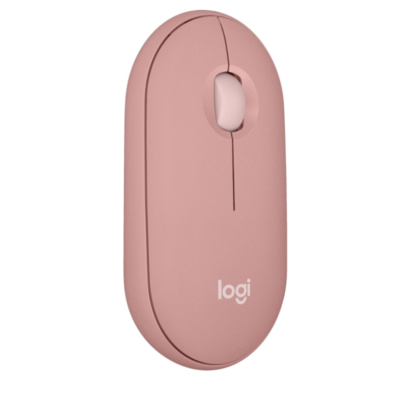
Logitech Pebble Mouse 2 M350s

0 Reviews
In stock

Original price was: KSh 7,400.Current price is: KSh 4,400.

  • Connectivity: Bluetooth Low Energy (BLE)
  • Receiver Support: Compatible with Logi Bolt (Receiver not included)
  • Multi-Device Pairing: Up to 3 devices via Easy-Switch
  • Sensor Technology: High-Precision Optical Tracking
  • DPI Range: 400 – 4000 DPI (Adjustable in 100 DPI increments)
  • Battery Life: 24 Months
  • Battery Type: 1 x AA (Included)
  • Buttons: 3 (Left/Right, Scroll wheel with customizable middle click)
  • Dimensions: 106.7 mm x 58.7 mm x 26.62 mm
  • Weight: 76g (Including battery)
GENUINE 100% Original
M-PESA Secure Pay
DELIVERY Fast Dispatch
SUPPORT Expert Help
Brand:

Product details

Logitech Pebble Mouse 2 M350s Price in Kenya

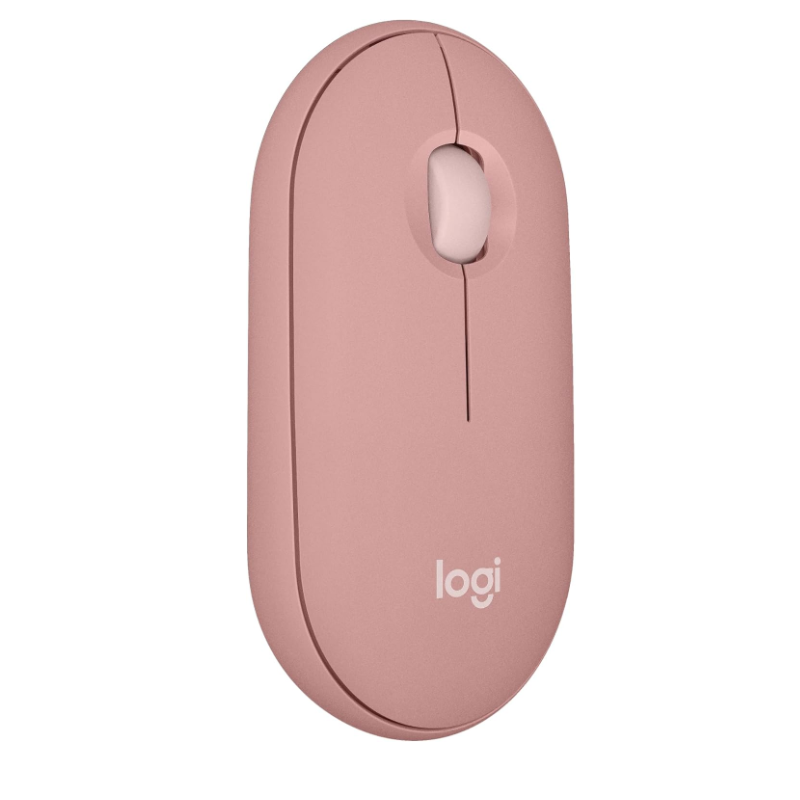
The Logitech Pebble Mouse 2 M350s price in Kenya is Ksh 3,500. This is the evolved, “smarter” version of the iconic original Pebble. While it retains the signature slim, pebble-shaped aesthetic that fits perfectly into any handbag or pocket, the M350s is a powerhouse under the hood. It shifts from being just a “basic travel mouse” to a versatile multi-tasker that can pair with up to three devices simultaneously.

Sustainability is a major focus here; the Pebble 2 is made with up to 76% recycled plastic, allowing you to stay stylish while being eco-conscious. With a significantly upgraded 4000 DPI sensor and a massive 2-year battery life, it offers a premium, high-precision experience that belies its minimalist appearance.

Defy boring. Elevate your mobile setup with a splash of color and smart tech. Buy the Logitech Pebble 2 M350s today at Exelic Gadgets for same-day delivery in Nairobi or reliable countrywide shipping via Wells Fargo/G4S.

Why You’ll Love It (The Lifestyle Upgrade)

  • 3-Device Easy-Switch: Use Bluetooth to pair with up to 3 wireless devices across different OSs, so that you can switch from typing on your laptop to navigating your iPad with one tap.
  • 4000 DPI Precision: The upgraded sensor is fully adjustable, so that you get smooth, precise tracking even on high-resolution screens.
  • 24-Month Battery Life: Optimized power usage gives you two full years on a single AA battery, so that you can forget about replacements for a long time.
  • Customizable App Shortcuts: Personalize the middle button via Logi Options+, so that you can send an emoji on WhatsApp or shuffle your Spotify playlist with one click.
  • Ultra-Portable Slim Profile: The minimalist, round design is incredibly thin, so that it slips into your laptop sleeve or pocket without any bulk.
  • SilentTouch Clicks: It removes 90% of click noise, so that you can work in total silence without distracting the people around you.

Logitech Pebble 2 M350s Specifications

Feature Details
Product Name Logitech Pebble Mouse 2 M350s
Price in Kenya Ksh 3,500
Special Feature Easy-Switch (3-Device Pairing)
Click Tech SilentTouch (90% Quieter)
Max DPI 4000 DPI
Battery Life 2 Years (24 Months)
Customization Logi Options+ App Support
Connectivity Bluetooth LE 5.1
Sustainability Up to 76% Recycled Plastic (Graphite)
Compatibility Windows, macOS, iPadOS, Android, ChromeOS

Pebble 2 vs. The Original Pebble M350

The M350s is a major upgrade. While the original M350 could only connect to two devices (one via USB, one via Bluetooth), the Pebble 2 can pair with three devices all via Bluetooth. The sensor has also jumped from a fixed 1000 DPI to an adjustable 4000 DPI, making it much more responsive on modern, high-density laptop screens. Furthermore, the battery life has been extended from 18 months to 24 months.

Logi Options+ & The “Smart” Middle Button

Unlike most basic mice, the Pebble 2’s middle button is “smart.” Using the Logi Options+ software on Windows or Mac, you can assign it to perform specific tasks. You can set it to open your favorite app, “Mute” your mic in Zoom, or even act as a “Boss Key” to hide your tabs quickly. This adds a layer of professional functionality to a mouse that looks like a lifestyle accessory.

SilentTouch & Gliding

Logitech has applied its SilentTouch technology to the Pebble 2, ensuring that the tactile feel of the click remains crisp while the sound is suppressed. The bottom of the mouse features high-quality glide pads that make movement silent as well. This makes it an ideal companion for the Pebble Keys 2 (K380s) keyboard for a completely silent and portable “office-in-a-bag” setup.

Who Is This Perfect For?

  1. The Multi-Device Student: You use a laptop for assignments, an iPad for drawing/notes, and sometimes your phone for quick edits. One mouse controls them all.
  2. The Minimalist Traveler: You hate bulky bags. You want a mouse that can hide in a pocket and still track reliably on cafe tables or hostel desks.
  3. The Style-Conscious Professional: You want your desk to look “Aesthetic.” The tonal colors (Graphite, Rose, White) and round shape make it a piece of desk art.

Alternatives & Competitors

  • Logitech M240 Silent: Similar price, also Bluetooth and silent, but has a more traditional “hump” shape rather than the flat Pebble design.
  • Logitech Pebble M350 (Gen 1): Often found slightly cheaper (Ksh 3,000), but lacks the 3-device switching and high DPI sensor.

Frequently Asked Questions (FAQs)

  • Does it come with a USB receiver?
  • No. The Pebble 2 M350s is designed for Bluetooth. It is compatible with the Logi Bolt receiver, but that is sold separately.
  • Will it work on my Android phone?
  • Yes! It works perfectly with Android 9.0 or later via Bluetooth.
  • Is it comfortable for large hands?
  • The Pebble 2 is a “slim” mouse, meaning your hand will sit relatively flat. If you have very large hands and prefer to rest your palm, you might prefer the Logitech M650 L.
  • Can I use it for gaming?
  • It’s great for casual gaming (Roblox, Strategy games). For fast-paced FPS games, its 125Hz polling rate might feel less responsive than a dedicated gaming mouse like the Logitech G305.

Buy the latest Mouse in Kenya at Exelic Gadgets.
Compare Logitech Pebble Mouse 2 M350s with Similar Products

Compare Logitech Pebble Mouse 2 M350s specs, features and price with similar computer mice and alternatives.

Compare Logitech Pebble Mouse 2 M350s with Similar Products

General

General specifications comparison
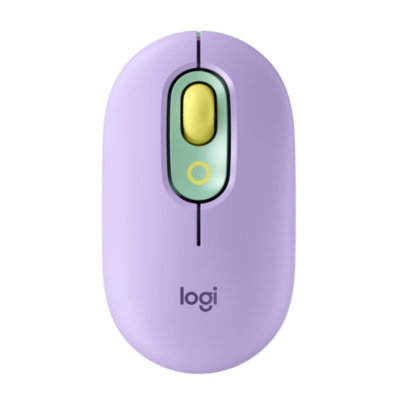
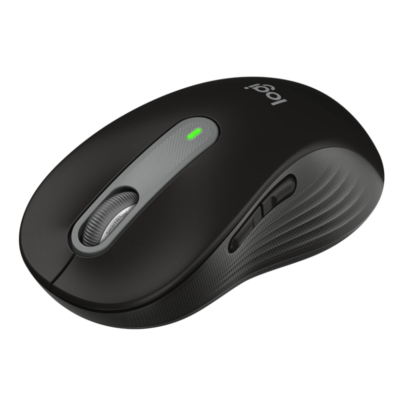
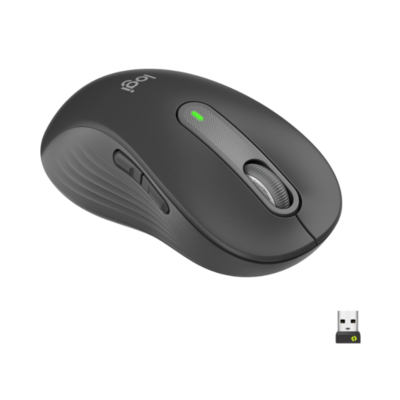
SpecificationLogitech Pebble Mouse 2 M350sLogitech Pop MouseLogitech Signature M650Logitech M650 L Left
BrandLogitechLogitechLogitechLogitech
ModelPebble Mouse 2 M350sPOP MouseSignature M650Signature M650 L Left
Announced2023202120222022
TypeBluetooth wireless mouseMulti-device Bluetooth mouseWireless productivity mouseLeft-handed wireless productivity mouse
ColorTonal Graphite; Tonal White; Tonal Rose; Tonal Sand; Tonal BlueDaydream; Blast; Heartbreaker; Mist; CosmosGraphite; Off-white; Rose; BlueGraphite

Sensor & Tracking

Sensor & Tracking specifications comparison
SpecificationLogitech Pebble Mouse 2 M350sLogitech Pop MouseLogitech Signature M650Logitech M650 L Left
Sensor TechnologyHigh-precision optical trackingHigh-precision optical trackingLogitech Advanced Optical TrackingLogitech Advanced Optical Tracking
DPI400–4,000 DPI; nominal 1,000 DPI1000–4,000 DPI; nominal 1,000 DPI400–4,000 DPI400–4,000 DPI
DPI AdjustmentYes — adjustable in 100-DPI incrementsYes — via Logi Options+Yes — via Logi Options+Yes — via Logi Options+

Buttons & Scrolling

Buttons & Scrolling specifications comparison
SpecificationLogitech Pebble Mouse 2 M350sLogitech Pop MouseLogitech Signature M650Logitech M650 L Left
Number of Buttons3455
Programmable ButtonsYes — customizable middle buttonYes — customizable top buttonYes — 2 customizable side buttonsYes — 2 customizable side buttons
Gesture ButtonN/AN/AN/AN/A
Scroll WheelMechanical line-by-line scroll wheelSmartWheel precision and speed scrollingSmartWheel line-by-line and fast scrollingSmartWheel line-by-line and fast scrolling
Horizontal ScrollNoNoNoNo
Thumb WheelN/AN/AN/AN/A
Button / Switch TypeSilent mechanical switchesSilentTouch mechanical switchesSilentTouch mechanical switchesSilentTouch mechanical switches

Connectivity

Connectivity specifications comparison
SpecificationLogitech Pebble Mouse 2 M350sLogitech Pop MouseLogitech Signature M650Logitech M650 L Left
Connection TypeWirelessWirelessWirelessWireless
Wireless TechnologyBluetooth Low Energy; Logi Bolt compatibleBluetooth 5.1 Low Energy; Logi Bolt compatibleBluetooth Low Energy; Logi BoltBluetooth Low Energy; Logi Bolt
BluetoothBluetooth Low EnergyBluetooth 5.1 Low EnergyBluetooth Low EnergyBluetooth Low Energy
Wireless ReceiverLogi Bolt receiver supported but not includedLogi Bolt receiver supported but not includedUSB-A Logi Bolt receiverUSB-A Logi Bolt receiver
Wireless RangeUp to 10 mUp to 10 mUp to 10 mUp to 10 m
Multi-Device ConnectionYes — up to 3 devicesYes — up to 3 devicesNoNo
Cable / ConnectorN/AN/AN/AN/A
Cable LengthN/AN/AN/AN/A

Battery & Power

Battery & Power specifications comparison
SpecificationLogitech Pebble Mouse 2 M350sLogitech Pop MouseLogitech Signature M650Logitech M650 L Left
Battery Type1 × AA battery1 × AA battery1 × AA battery1 × AA battery
Battery CapacityN/AN/AN/AN/A
Battery LifeUp to 24 monthsUp to 24 monthsUp to 24 monthsUp to 24 months
Charging PortN/AN/AN/AN/A
Charging TimeN/AN/AN/AN/A
Fast ChargingN/AN/AN/AN/A
Wireless ChargingN/AN/AN/AN/A

Features

Features specifications comparison
SpecificationLogitech Pebble Mouse 2 M350sLogitech Pop MouseLogitech Signature M650Logitech M650 L Left
Customization SoftwareLogi Options+Logi Options+Logi Options+Logi Options+
Onboard MemoryNoNoNoNo
ProfilesApplication-specific software profilesApplication-specific software profilesApplication-specific software profilesApplication-specific software profiles
RGB LightingNoNoNoNo
Haptic FeedbackNoNoNoNo
Silent ClicksYes — Silent Touch TechnologyYes — SilentTouchYes — SilentTouchYes — SilentTouch
Special FeaturesEasy-Switch; customizable shortcut button; slim portable design; recycled plastic constructionCustomizable emoji/shortcut button; SmartWheel; Easy-Switch; Logitech FlowSmartWheel; contoured shape; rubber side grips; customizable side buttonsLeft-handed design; SmartWheel; rubber side grip; customizable side buttons

Design

Design specifications comparison
SpecificationLogitech Pebble Mouse 2 M350sLogitech Pop MouseLogitech Signature M650Logitech M650 L Left
Dimensions106.7 × 58.7 × 26.62 mm104.8 × 59.4 × 35.2 mm107.19 × 61.8 × 37.8 mm118.9 × 65.6 × 41.5 mm
Weight76 g (with battery)82 g (with battery)101.2 g (with battery)111.2 g (with battery)
Hand OrientationAmbidextrousAmbidextrousRight-handedLeft-handed
Form FactorSlim compact mouseCompact mouseStandard contoured mouseLarge contoured mouse
Grip StyleFingertipFingertip / clawPalm / clawPalm
MaterialRecycled plasticPlasticRecycled plastic with rubber side gripsRecycled plastic with rubber side grip

System Requirements

System Requirements specifications comparison
SpecificationLogitech Pebble Mouse 2 M350sLogitech Pop MouseLogitech Signature M650Logitech M650 L Left
WindowsWindows 10, Windows 11 or laterWindows 10, Windows 11 or laterWindows 10, Windows 11 or laterWindows 10, Windows 11 or later
macOSmacOS 11 or latermacOS 10.15 or latermacOS 10.15 or latermacOS 10.15 or later
Other Operating SystemsiPadOS 14 or later; Android 9 or later; ChromeOS; LinuxChromeOS; iPadOS 13.4 or later; Linux; AndroidChromeOS; Linux; iPadOS 13.4 or later; Android 5.0 or laterChromeOS; Linux; iPadOS 13.4 or later; Android 5.0 or later
Required Port / ConnectionBluetooth; optional USB-A port for Logi Bolt receiverBluetooth; optional USB-A port for Logi Bolt receiverUSB-A port or BluetoothUSB-A port or Bluetooth
SoftwareLogi Options+ (optional)Logi Options+ (optional)Logi Options+ (optional)Logi Options+ (optional)

What's in the Box

What's in the Box specifications comparison
SpecificationLogitech Pebble Mouse 2 M350sLogitech Pop MouseLogitech Signature M650Logitech M650 L Left
In the BoxPebble Mouse 2 M350s, AA battery and user documentationPOP Mouse, AA battery and user documentationSignature M650 mouse, Logi Bolt USB receiver, AA battery and user documentationSignature M650 L Left mouse, Logi Bolt USB receiver, AA battery and user documentation

Specs

Logitech Pebble Mouse 2 M350s specifications

General

Logitech Pebble Mouse 2 M350s — General
BrandLogitech
ModelPebble Mouse 2 M350s
Announced2023
TypeBluetooth wireless mouse
ColorTonal Graphite; Tonal White; Tonal Rose; Tonal Sand; Tonal Blue
Dimensions106.7 × 58.7 × 26.62 mm
Weight76 g (with battery)

Sensor & Tracking

Logitech Pebble Mouse 2 M350s — Sensor & Tracking
Sensor TechnologyHigh-precision optical tracking
DPI400–4,000 DPI; nominal 1,000 DPI
DPI AdjustmentYes — adjustable in 100-DPI increments
Tracking SpeedNot specified
AccelerationNot specified
Polling RateNot specified

Buttons & Scrolling

Logitech Pebble Mouse 2 M350s — Buttons & Scrolling
Number of Buttons3
Programmable ButtonsYes — customizable middle button
Gesture ButtonN/A
Scroll WheelMechanical line-by-line scroll wheel
Horizontal ScrollNo
Thumb WheelN/A
Button / Switch TypeSilent mechanical switches

Connectivity

Logitech Pebble Mouse 2 M350s — Connectivity
Connection TypeWireless
Wireless TechnologyBluetooth Low Energy; Logi Bolt compatible
BluetoothBluetooth Low Energy
Wireless ReceiverLogi Bolt receiver supported but not included
Wireless RangeUp to 10 m
Multi-Device ConnectionYes — up to 3 devices
Cable / ConnectorN/A
Cable LengthN/A

Battery & Power

Logitech Pebble Mouse 2 M350s — Battery & Power
Battery Type1 × AA battery
Battery CapacityN/A
Battery LifeUp to 24 months
Charging PortN/A
Charging TimeN/A
Fast ChargingN/A
Wireless ChargingN/A

Features

Logitech Pebble Mouse 2 M350s — Features
Customization SoftwareLogi Options+
Onboard MemoryNo
ProfilesApplication-specific software profiles
RGB LightingNo
Haptic FeedbackNo
Silent ClicksYes — Silent Touch Technology
Special FeaturesEasy-Switch; customizable shortcut button; slim portable design; recycled plastic construction

Design

Logitech Pebble Mouse 2 M350s — Design
Hand OrientationAmbidextrous
Form FactorSlim compact mouse
Grip StyleFingertip
MaterialRecycled plastic

System Requirements

Logitech Pebble Mouse 2 M350s — System Requirements
WindowsWindows 10, Windows 11 or later
macOSmacOS 11 or later
Other Operating SystemsiPadOS 14 or later; Android 9 or later; ChromeOS; Linux
Required Port / ConnectionBluetooth; optional USB-A port for Logi Bolt receiver
SoftwareLogi Options+ (optional)

What's in the Box

Logitech Pebble Mouse 2 M350s — What's in the Box
In the BoxPebble Mouse 2 M350s, AA battery and user documentation

0 Reviews

No reviews yet

Be the first to review Logitech Pebble Mouse 2 M350s.

Write a review
Back to Top

My Cart