Skip to content

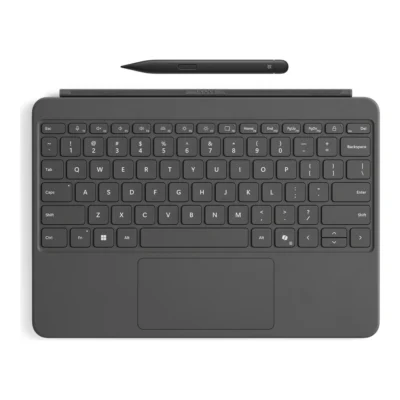
Microsoft Surface Pro 12-inch Keyboard with Slim Pen Customer Reviews

Customer Reviews 0

No ratings yet

No reviews yet

Be the first to review Microsoft Surface Pro 12-inch Keyboard with Slim Pen.

Write a Review
Write a Review

Your email address, order details and contact information are never shown publicly.

Your rating

Up to 5 photos, 5 MB each. JPG, PNG or WebP. Location data is removed.

    Back to Top

    Microsoft Surface Pro 12-inch Keyboard Highlights

    • Moving mechanical keys switch type
    • Backlighting
    • Smooth-matte palm rest material
    • Surface Pro 12-inch keyboard connector connector
    • 340 g weight
    • Connection Type magnetic attachment to compatible Surface Pro 12-inch

    Compare Microsoft Surface Pro 12-inch Keyboard with Slim Pen with Similar Products

    Compare Microsoft Surface Pro 12-inch Keyboard with Slim Pen specs, features and price with similar keyboards and alternatives.

    Compare Microsoft Surface Pro 12-inch Keyboard with Slim Pen with Similar Products

    General

    General specifications comparison
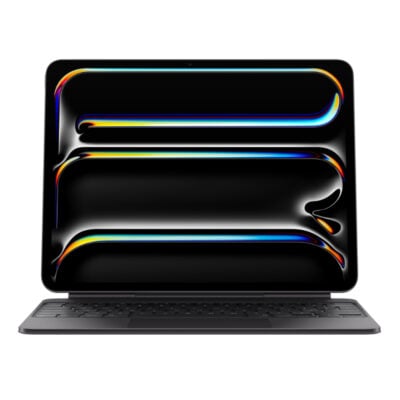
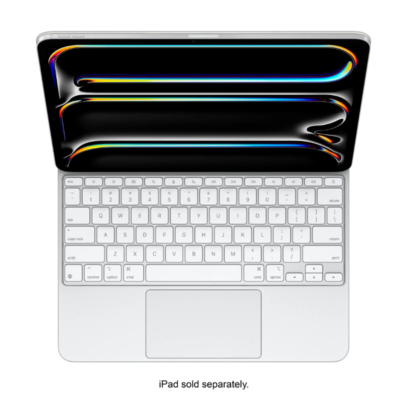
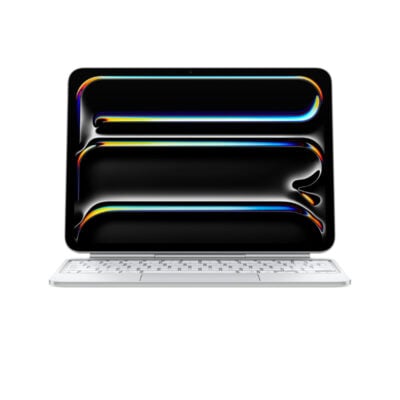
    SpecificationMicrosoft Surface Pro 12-inch Keyboard with Slim PenApple iPad Pro 11-inch M4 Magic KeyboardiPad Pro 13-inch (M4/M5) Magic KeyboardMagic Keyboard for iPad Pro 13‑inch (M4)
    BrandMicrosoftAppleAppleApple
    ModelSurface Pro 12-inch Keyboard with Slim Pen, EP2-33047Magic Keyboard for iPad Pro 11-inch (M4/M5)Magic Keyboard for iPad Pro 13-inch (M4/M5)Magic Keyboard for iPad Pro 13-inch (M4/M5)
    TypeDetachable tablet keyboard with Slim Pen bundleiPad keyboard cover with trackpadiPad keyboard cover with trackpadiPad keyboard cover with trackpad
    LayoutEnglish; full row F1–F12 function keys
    ColorSlateBlack, WhiteBlack, White
    MaterialSmooth-matte palm rest; Alcantara back cover and hingeAluminum palm rest and machined aluminum hingeAluminum palm rest and machined aluminum hingeAluminum palm rest and machined aluminum hinge

    Keys & Switches

    Keys & Switches specifications comparison
    SpecificationMicrosoft Surface Pro 12-inch Keyboard with Slim PenApple iPad Pro 11-inch M4 Magic KeyboardiPad Pro 13-inch (M4/M5) Magic KeyboardMagic Keyboard for iPad Pro 13‑inch (M4)
    Switch TypeMoving mechanical keysScissor mechanismScissor mechanismScissor mechanism
    Dedicated Multimedia KeysCopilot, microphone mute, snipping, Windows shortcuts, media, brightness and lock keys14-key function row for brightness, volume and other controls14-key function row for brightness, volume and other controls14-key function row for brightness, volume and other controls
    Numeric KeypadNo
    Total Travel1mm1mm1mm

    Connectivity

    Connectivity specifications comparison
    SpecificationMicrosoft Surface Pro 12-inch Keyboard with Slim PenApple iPad Pro 11-inch M4 Magic KeyboardiPad Pro 13-inch (M4/M5) Magic KeyboardMagic Keyboard for iPad Pro 13‑inch (M4)
    Connection TypeMagnetic attachment to compatible Surface Pro 12-inchMagnetic attachment to a compatible iPad; no wireless pairing requiredMagnetic attachment to a compatible iPad; no wireless pairing requiredMagnetic attachment to a compatible iPad; no wireless pairing required
    ConnectorSurface Pro 12-inch keyboard connector

    Battery & Power

    Battery & Power specifications comparison
    SpecificationMicrosoft Surface Pro 12-inch Keyboard with Slim PenApple iPad Pro 11-inch M4 Magic KeyboardiPad Pro 13-inch (M4/M5) Magic KeyboardMagic Keyboard for iPad Pro 13‑inch (M4)
    Charging PortUSB-C pass-through charging for iPad; this port does not transmit dataUSB-C pass-through charging for iPad; this port does not transmit dataUSB-C pass-through charging for iPad; this port does not transmit data

    Lighting & Features

    Lighting & Features specifications comparison
    SpecificationMicrosoft Surface Pro 12-inch Keyboard with Slim PenApple iPad Pro 11-inch M4 Magic KeyboardiPad Pro 13-inch (M4/M5) Magic KeyboardMagic Keyboard for iPad Pro 13‑inch (M4)
    BacklightingYesBacklit keysBacklit keysBacklit keys
    Wrist RestSmooth-matte palm rest
    Special FeaturesPrecision touchpad with adaptive touch mode; dynamic hinge flexes 360°; included Slim Pen with 4,096 pressure levels and haptic feedbackFloating adjustable hinge, glass trackpad with haptic feedback, and front/back protectionFloating adjustable hinge, glass trackpad with haptic feedback, and front/back protectionFloating adjustable hinge, glass trackpad with haptic feedback, and front/back protection

    System Requirements

    System Requirements specifications comparison
    SpecificationMicrosoft Surface Pro 12-inch Keyboard with Slim PenApple iPad Pro 11-inch M4 Magic KeyboardiPad Pro 13-inch (M4/M5) Magic KeyboardMagic Keyboard for iPad Pro 13‑inch (M4)
    WindowsSurface Pro 12-inch (1st Edition) running Windows 11
    Required Port / ConnectionCompatible only with Surface Pro 12-inch (1st Edition)
    Other Operating SystemsiPad Pro 11-inch (M4 or M5), with iPadOS 17.4 or lateriPad Pro 13-inch (M4 or M5), with iPadOS 17.4 or lateriPad Pro 13-inch (M4 or M5), with iPadOS 17.4 or later

    What's in the Box

    What's in the Box specifications comparison
    SpecificationMicrosoft Surface Pro 12-inch Keyboard with Slim PenApple iPad Pro 11-inch M4 Magic KeyboardiPad Pro 13-inch (M4/M5) Magic KeyboardMagic Keyboard for iPad Pro 13‑inch (M4)
    In the BoxSurface Pro 12-inch Keyboard, Surface Slim Pen (2nd Edition), Quick Start Guide

    Design

    Design specifications comparison
    SpecificationMicrosoft Surface Pro 12-inch Keyboard with Slim PenApple iPad Pro 11-inch M4 Magic KeyboardiPad Pro 13-inch (M4/M5) Magic KeyboardMagic Keyboard for iPad Pro 13‑inch (M4)
    DimensionsKeyboard: 276 × 192 × 6.80mm; Slim Pen: 136.8 × 11.3 × 6.3mm
    WeightKeyboard: 340g; Slim Pen: 13g

    Specs

    Microsoft Surface Pro 12-inch Keyboard with Slim Pen specifications

    General

    Microsoft Surface Pro 12-inch Keyboard with Slim Pen — General
    BrandMicrosoft
    ModelSurface Pro 12-inch Keyboard with Slim Pen, EP2-33047
    TypeDetachable tablet keyboard with Slim Pen bundle
    LayoutEnglish; full row F1–F12 function keys
    ColorSlate
    MaterialSmooth-matte palm rest; Alcantara back cover and hinge
    DimensionsKeyboard: 276 × 192 × 6.80mm; Slim Pen: 136.8 × 11.3 × 6.3mm
    WeightKeyboard: 340g; Slim Pen: 13g

    Keys & Switches

    Microsoft Surface Pro 12-inch Keyboard with Slim Pen — Keys & Switches
    Switch TypeMoving mechanical keys
    Dedicated Multimedia KeysCopilot, microphone mute, snipping, Windows shortcuts, media, brightness and lock keys
    Numeric KeypadNo

    Connectivity

    Microsoft Surface Pro 12-inch Keyboard with Slim Pen — Connectivity
    Connection TypeMagnetic attachment to compatible Surface Pro 12-inch
    ConnectorSurface Pro 12-inch keyboard connector

    Lighting & Features

    Microsoft Surface Pro 12-inch Keyboard with Slim Pen — Lighting & Features
    BacklightingYes
    Wrist RestSmooth-matte palm rest
    Special FeaturesPrecision touchpad with adaptive touch mode; dynamic hinge flexes 360°; included Slim Pen with 4,096 pressure levels and haptic feedback

    System Requirements

    Microsoft Surface Pro 12-inch Keyboard with Slim Pen — System Requirements
    WindowsSurface Pro 12-inch (1st Edition) running Windows 11
    Required Port / ConnectionCompatible only with Surface Pro 12-inch (1st Edition)

    What's in the Box

    Microsoft Surface Pro 12-inch Keyboard with Slim Pen — What's in the Box
    In the BoxSurface Pro 12-inch Keyboard, Surface Slim Pen (2nd Edition), Quick Start Guide

    My Cart