Microsoft Surface Pro Flex keyboard with Slim Pen Customer Reviews
Customer Reviews 0
—No ratings yet
0
0
0
0
0
No reviews yet
Be the first to review Microsoft Surface Pro Flex keyboard with Slim Pen.
Write a Review
No ratings yet
Be the first to review Microsoft Surface Pro Flex keyboard with Slim Pen.
Write a ReviewCompare Microsoft Surface Pro Flex keyboard with Slim Pen specs, features and price with similar keyboards and alternatives.
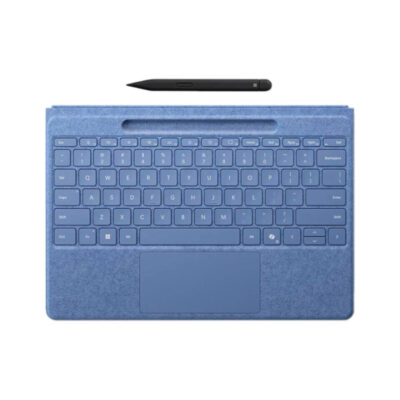 Microsoft Surface Pro Flex keyboard with Slim Pen
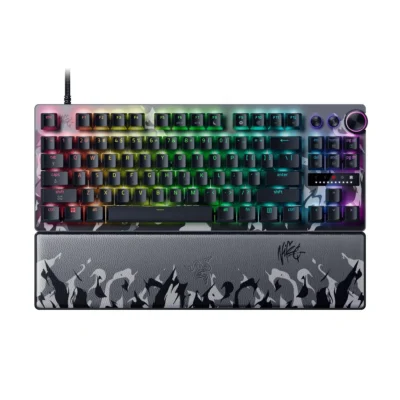 Razer Huntsman V3 Pro Tenkeyless 8KHz Niko Edition
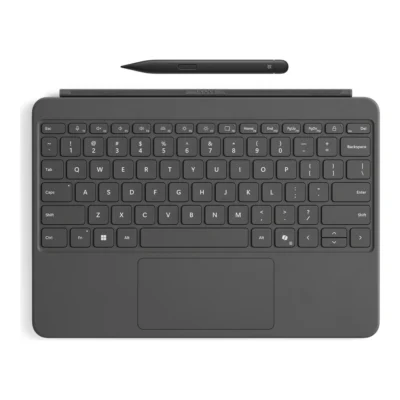 Microsoft Surface Pro 12-inch Keyboard with Slim Pen
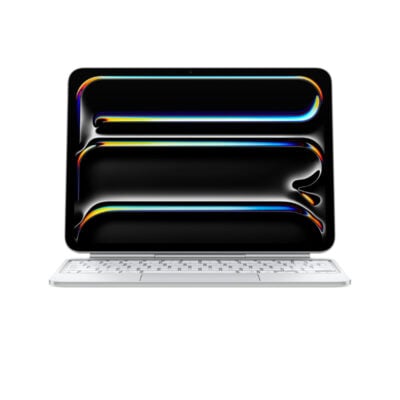 Apple iPad Pro 11-inch M4 Magic Keyboard
| Specification | Microsoft Surface Pro Flex keyboard with Slim Pen | Razer Huntsman V3 Pro Tenkeyless 8KHz Niko Edition | Microsoft Surface Pro 12-inch Keyboard with Slim Pen | Apple iPad Pro 11-inch M4 Magic Keyboard |
|---|---|---|---|---|
| Brand | Microsoft | Razer | Microsoft | Apple |
| Model | Surface Pro Flex Keyboard with Slim Pen | Huntsman V3 Pro Tenkeyless 8KHz NiKo Edition (RZ03-0552) | Surface Pro 12-inch Keyboard with Slim Pen, EP2-33047 | Magic Keyboard for iPad Pro 11-inch (M4/M5) |
| Announced | 2024 | 2025 | Not specified | Not specified |
| Type | Wireless and detachable keyboard cover | Wired analog optical gaming keyboard | Detachable tablet keyboard with Slim Pen bundle | iPad keyboard cover with trackpad |
| Layout | Compact notebook-style | Tenkeyless (TKL) | English; full row F1–F12 function keys | Not specified |
| Color | Black; Bright Sapphire | NiKo Edition | Slate | Not specified |
| Material | Alcantara-covered keyboard deck | 5052 aluminum alloy top plate with plastic base | Smooth-matte palm rest; Alcantara back cover and hinge | Aluminum palm rest and machined aluminum hinge |
| Specification | Microsoft Surface Pro Flex keyboard with Slim Pen | Razer Huntsman V3 Pro Tenkeyless 8KHz Niko Edition | Microsoft Surface Pro 12-inch Keyboard with Slim Pen | Apple iPad Pro 11-inch M4 Magic Keyboard |
|---|---|---|---|---|
| Switch Type | Scissor | Analog optical | Moving mechanical keys | Scissor mechanism |
| Switches | Mechanical scissor keys | Razer Analog Optical Switches Gen-2 | Not specified | Not specified |
| Switch Options | Not applicable | Linear | Not specified | Not specified |
| Dedicated Multimedia Keys | Yes — function-row shortcuts | Yes — multi-function dial and 2 buttons | Copilot, microphone mute, snipping, Windows shortcuts, media, brightness and lock keys | 14-key function row for brightness, volume and other controls |
| Programmable Keys | Yes — Copilot key and adaptive touchpad gestures | Yes | Not specified | Not specified |
| Numeric Keypad | No | No | No | Not specified |
| Actuation Force | Not specified | 40 gf | Not specified | Not specified |
| Actuation Point | Not specified | Adjustable 0.1–4.0 mm | Not specified | Not specified |
| Total Travel | Not specified | 4.0 mm | Not specified | 1mm |
| Key Rollover | Not specified | N-key rollover | Not specified | Not specified |
| Anti-Ghosting | Not specified | Yes | Not specified | Not specified |
| Specification | Microsoft Surface Pro Flex keyboard with Slim Pen | Razer Huntsman V3 Pro Tenkeyless 8KHz Niko Edition | Microsoft Surface Pro 12-inch Keyboard with Slim Pen | Apple iPad Pro 11-inch M4 Magic Keyboard |
|---|---|---|---|---|
| Connection Type | Wireless and Surface magnetic connector | Wired | Magnetic attachment to compatible Surface Pro 12-inch | Magnetic attachment to a compatible iPad; no wireless pairing required |
| Wireless Technology | Bluetooth Low Energy | Not applicable | Not specified | Not specified |
| Bluetooth | Bluetooth Low Energy | Not applicable | Not specified | Not specified |
| Wireless Receiver | Not applicable | Not applicable | Not specified | Not specified |
| Multi-Device Connection | No | Not applicable | Not specified | Not specified |
| Connector | Surface Pro magnetic interface connector | USB-C keyboard port; USB-A host connection | Surface Pro 12-inch keyboard connector | Not specified |
| Cable | Not applicable | Detachable braided USB-C to USB-A cable | Not specified | Not specified |
| Cable Length | Not applicable | 2.0 m | Not specified | Not specified |
| Wireless Range | Not specified | Not applicable | Not specified | Not specified |
| Specification | Microsoft Surface Pro Flex keyboard with Slim Pen | Razer Huntsman V3 Pro Tenkeyless 8KHz Niko Edition | Microsoft Surface Pro 12-inch Keyboard with Slim Pen | Apple iPad Pro 11-inch M4 Magic Keyboard |
|---|---|---|---|---|
| Battery Type | Built-in rechargeable battery | Not applicable | Not specified | Not specified |
| Battery Life | Up to 41 hours detached continuous typing | Not applicable | Not specified | Not specified |
| Charging Port | Charges while attached to compatible Surface Pro | Not applicable | Not specified | USB-C pass-through charging for iPad; this port does not transmit data |
| Power Switch | Not applicable | Not applicable | Not specified | Not specified |
| Battery Indicator | Yes — Windows battery status | Not applicable | Not specified | Not specified |
| Battery Capacity | Not specified | Not applicable | Not specified | Not specified |
| Charging Time | Not specified | Not applicable | Not specified | Not specified |
| Specification | Microsoft Surface Pro Flex keyboard with Slim Pen | Razer Huntsman V3 Pro Tenkeyless 8KHz Niko Edition | Microsoft Surface Pro 12-inch Keyboard with Slim Pen | Apple iPad Pro 11-inch M4 Magic Keyboard |
|---|---|---|---|---|
| Backlighting | White | RGB | Yes | Backlit keys |
| Lighting Technology | Backlit keys | Razer Chroma RGB per-key lighting | Not specified | Not specified |
| Brightness Adjustment | Yes | Yes | Not specified | Not specified |
| Ambient Light Sensor | No | No | Not specified | Not specified |
| Proximity Sensor | No | No | Not specified | Not specified |
| Wrist Rest | Integrated keyboard deck | Included magnetic leatherette wrist rest | Smooth-matte palm rest | Not specified |
| Customization Software | Windows Settings; Surface app | Razer Synapse 4 | Not specified | Not specified |
| Onboard Memory | No | Yes | Not specified | Not specified |
| Profiles / Macros | No | Up to 6 onboard profiles; fully programmable keys and macros | Not specified | Not specified |
| Special Features | Works attached or detached; precision haptic touchpad; Slim Pen storage and charging; Copilot key | NiKo Edition artwork; 8,000Hz polling; Rapid Trigger; Snap Tap; PBT keycaps | Precision touchpad with adaptive touch mode; dynamic hinge flexes 360°; included Slim Pen with 4,096 pressure levels and haptic feedback | Floating adjustable hinge, glass trackpad with haptic feedback, and front/back protection |
| Specification | Microsoft Surface Pro Flex keyboard with Slim Pen | Razer Huntsman V3 Pro Tenkeyless 8KHz Niko Edition | Microsoft Surface Pro 12-inch Keyboard with Slim Pen | Apple iPad Pro 11-inch M4 Magic Keyboard |
|---|---|---|---|---|
| Windows | Windows 11 on compatible Surface Pro | Windows 10 64-bit or later | Surface Pro 12-inch (1st Edition) running Windows 11 | Not specified |
| macOS | No | Not supported by Razer Synapse | Not specified | Not specified |
| Other Operating Systems | No | Not specified | Not specified | iPad Pro 11-inch (M4 or M5), with iPadOS 17.4 or later |
| Required Port / Connection | Compatible Surface Pro magnetic connector or Bluetooth Low Energy | USB-A port | Compatible only with Surface Pro 12-inch (1st Edition) | Not specified |
| Software | Surface app optional | Razer Synapse 4 optional | Not specified | Not specified |
| Specification | Microsoft Surface Pro Flex keyboard with Slim Pen | Razer Huntsman V3 Pro Tenkeyless 8KHz Niko Edition | Microsoft Surface Pro 12-inch Keyboard with Slim Pen | Apple iPad Pro 11-inch M4 Magic Keyboard |
|---|---|---|---|---|
| In the Box | Surface Pro Flex Keyboard, Surface Slim Pen, safety and warranty documents | Huntsman V3 Pro TKL 8KHz NiKo Edition keyboard, detachable USB cable, magnetic wrist rest, documentation | Surface Pro 12-inch Keyboard, Surface Slim Pen (2nd Edition), Quick Start Guide | Not specified |
| Specification | Microsoft Surface Pro Flex keyboard with Slim Pen | Razer Huntsman V3 Pro Tenkeyless 8KHz Niko Edition | Microsoft Surface Pro 12-inch Keyboard with Slim Pen | Apple iPad Pro 11-inch M4 Magic Keyboard |
|---|---|---|---|---|
| Dimensions | 289.1 × 226.1 × 5.25 mm | 363 × 139 × 38 mm | Keyboard: 276 × 192 × 6.80mm; Slim Pen: 136.8 × 11.3 × 6.3mm | Not specified |
| Weight | 340 g | 981 g | Keyboard: 340g; Slim Pen: 13g | Not specified |
Microsoft Surface Pro Flex keyboard with Slim Pen specifications
| Brand | Microsoft |
|---|---|
| Model | Surface Pro Flex Keyboard with Slim Pen |
| Announced | 2024 |
| Type | Wireless and detachable keyboard cover |
| Layout | Compact notebook-style |
| Color | Black; Bright Sapphire |
| Material | Alcantara-covered keyboard deck |
| Dimensions | 289.1 × 226.1 × 5.25 mm |
| Weight | 340 g |
| Switch Type | Scissor |
|---|---|
| Switches | Mechanical scissor keys |
| Dedicated Multimedia Keys | Yes — function-row shortcuts |
| Programmable Keys | Yes — Copilot key and adaptive touchpad gestures |
| Numeric Keypad | No |
| Connection Type | Wireless and Surface magnetic connector |
|---|---|
| Wireless Technology | Bluetooth Low Energy |
| Bluetooth | Bluetooth Low Energy |
| Multi-Device Connection | No |
| Connector | Surface Pro magnetic interface connector |
| Battery Type | Built-in rechargeable battery |
|---|---|
| Battery Life | Up to 41 hours detached continuous typing |
| Charging Port | Charges while attached to compatible Surface Pro |
| Battery Indicator | Yes — Windows battery status |
| Backlighting | White |
|---|---|
| Lighting Technology | Backlit keys |
| Brightness Adjustment | Yes |
| Ambient Light Sensor | No |
| Proximity Sensor | No |
| Wrist Rest | Integrated keyboard deck |
| Customization Software | Windows Settings; Surface app |
| Onboard Memory | No |
| Profiles / Macros | No |
| Special Features | Works attached or detached; precision haptic touchpad; Slim Pen storage and charging; Copilot key |
| Windows | Windows 11 on compatible Surface Pro |
|---|---|
| macOS | No |
| Other Operating Systems | No |
| Required Port / Connection | Compatible Surface Pro magnetic connector or Bluetooth Low Energy |
| Software | Surface app optional |
| In the Box | Surface Pro Flex Keyboard, Surface Slim Pen, safety and warranty documents |
|---|
We are here to serve you
Keep a link to this cart, or ask us to send it to you. Reminders are optional.
You may send me reminders about this cart on the channels I select. I can opt out at any time.
Only the details you provide here or in checkout are used. Reminders are optional. Privacy notice
Write a Review