Skip to content
Category: Brand:

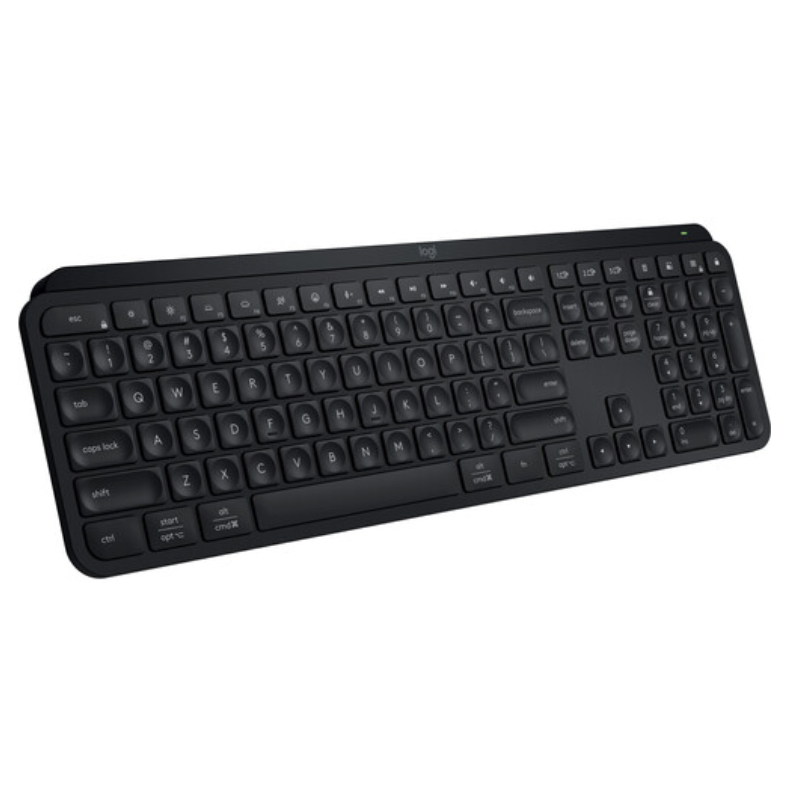
Logitech MX Keys S

0 Reviews
In stock

KSh 16,000

 Specifications

  • Connectivity: Bluetooth Low Energy + Logi Bolt USB Receiver
  • Multi-Device Pairing: Easy-Switch for up to 3 devices
  • Switch Type: Low-profile Scissor Switches
  • Backlighting: Auto-adjusting White LED with hand proximity sensors
  • Battery: Rechargeable Li-Po (1500 mAh)
  • Charging Port: USB-C (Quick charge supported)
  • Build Quality: Single-plate metal chassis for stability
  • Weight: 810g (Stays firmly in place)
  • Dimensions: 430.2 mm x 131.6 mm x 20.5 mm
  • Software: Logi Options+ (with Smart Actions and Flow)
GENUINE 100% Original
M-PESA Secure Pay
DELIVERY Fast Dispatch
SUPPORT Expert Help
Brand:

Product details

Logitech MX Keys S Price in Kenya

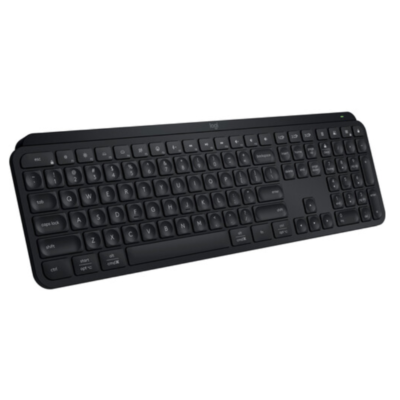
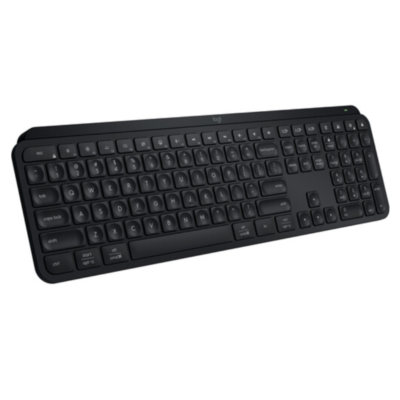
The Logitech MX Keys S price in Kenya is Ksh 6,000. While the original MX Keys was a masterpiece, the “S” version is the refined, high-performance successor designed for elite professionals, developers, and writers. It remains the flagship of Logitech’s non-mechanical lineup, offering a typing experience that is widely considered the best in the world for productivity.

The MX Keys S introduces Smart Actions via the Logi Options+ app, allowing you to automate complex tasks with a single keystroke—like opening your browser, Slack, and Zoom simultaneously. It now also features Quiet Click technology and an upgraded Logi Bolt receiver for enterprise-grade security and a more stable connection in busy Nairobi offices filled with wireless interference.Built from a single metal plate, the keyboard is remarkably solid and stays planted on your desk no matter how fast you type. Its spherically-dished keys match the shape of your fingertips, providing a tactile, laptop-like feel that is both fast and whisper-quiet. With Smart Illumination that detects your hands’ approach and adapts to the room’s light, it is the ultimate tool for those who work late into the night.

Master your output. Move beyond simple typing and start automating your day. Buy the Logitech MX Keys S at Exelic Gadgets for same-day delivery in Nairobi or secure nationwide shipping via Wells Fargo/G4S.

Why You’ll Love It

  • Spherically-Dished Keys: Every key is indented to cradle your fingertips, so that you type with more precision and significantly fewer errors.
  • Smart Actions (Macros): Automate repetitive tasks with one button, so that you can skip the tedious clicks and focus on your actual work.
  • Adaptive Smart Illumination: Proximity sensors light up the keys as your hands approach, so that you can work seamlessly in any lighting condition without looking for the keys.
  • Logi Bolt Security: Includes the new Bolt receiver, so that you have a more secure, lag-free connection even in environments with heavy Wi-Fi congestion.
  • Multi-OS, Multi-Device: Pair with up to 3 devices and switch between Windows, macOS, Linux, and iPadOS instantly, so that one keyboard rules all your tech.
  • USB-C Quick Charging: Stays powered for up to 10 days with backlighting (or 5 months without), so that you rarely have to think about the charging cable.

Logitech MX Keys S Specifications

Feature Details
Product Name Logitech MX Keys S
Price in Kenya Ksh 16,000
Connection Logi Bolt & Bluetooth LE
Battery Life 10 Days (Backlit) / 5 Months (Off)
Smart Actions Yes (Logi Options+ Required)
Number Pad Yes (Full-size layout)
Quiet Keys Yes (Optimized for silence)
Sustainability 26% Recycled Plastic (Graphite model)
Dual Layout Optimized for both Mac & Windows
OS Compatibility Windows, macOS, Linux, ChromeOS, iPadOS, Android

Smart Actions: The Efficiency Engine

The biggest software jump in the MX Keys S is Smart Actions. Imagine you start your work day by opening Chrome, your CRM, and your email. Instead of doing it manually, you can program a single F-key to execute all those actions at once. It’s like having a personal assistant built into your keyboard.

Spherically-Dished Keys & Scissor Switches

Most keyboards have flat or slightly cylindrical keys. The MX Keys S uses a spherical dish—each key has a circular indentation. This guides your finger to the center of the key, which is scientifically proven to reduce typos. Combined with high-quality scissor switches, the travel is short and responsive, mimicking the feel of a high-end laptop but with much better tactile feedback.

Intelligent Backlighting

The MX Keys S doesn’t just stay “on.” It uses an ambient light sensor to determine if you actually need light. If your room is bright, it stays off to save battery. As soon as your hands come within an inch of the keyboard, it “wakes up” and glows. You can now also customize the duration and brightness of the lighting within the Logi Options+ app.

Logi Bolt vs. Unifying

The original MX Keys used the “Unifying” receiver (orange logo). The MX Keys S uses Logi Bolt (green bolt logo). Bolt is based on Bluetooth Low Energy but is far more secure (FIPS compliant) and handles interference much better. If you have an MX Master 3S mouse, it uses the same Bolt receiver, allowing you to use both on a single USB port.

Who Is This Perfect For?

  1. The Software Developer: You need a rock-solid typing experience, a full number pad, and the ability to automate coding environments with Smart Actions
  2. The Content Writer: You spend 8+ hours a day typing. The spherically-dished keys reduce finger fatigue and help you maintain a high words-per-minute (WPM) count.
  3. The Executive Multi-Tasker: You have a PC on your desk and an iPad/MacBook on the side. Switching between them at the touch of a button is seamless and professional

Alternatives & Competitors

Frequently Asked Questions (FAQs)

  • Does it work with a Mac?
  • Yes! It has dual-labeled keys (Start/Opt and Alt/Cmd) and is fully optimized for macOS.
  • What is the difference between MX Keys and MX Keys S?
  • The “S” version adds Smart Actions, uses the more secure Logi Bolt receiver, has better backlighting customization, and uses more recycled materials.
  • Is it rechargeable?
  • Yes, via the included USB-C cable. A full charge takes about 3 hours.
  • Can I use it while it’s charging?
  • Yes, it functions perfectly as a “wired” keyboard while plugged in to charge.
  • Is it silent?
  • It is extremely quiet. It’s significantly quieter than a mechanical keyboard and even quieter than standard membrane keyboards.
    Buy the latest  in Kenya at Exelic Gadgets

Compare Logitech MX Keys S with Similar Products

Compare Logitech MX Keys S specs, features and price with similar keyboards and alternatives.

Compare Logitech MX Keys S with Similar Products
Selected Item
Logitech MX Keys SKSh 16,000Add to cart

General

General specifications comparison
SpecificationLogitech MX Keys SLogitech MX Keys MiniLogitech POP KeysLogitech MX Keys
BrandLogitechLogitechLogitechLogitech
ModelMX Keys SMX Keys MiniPOP KeysMX Keys
Announced2023202120212019
TypeWireless illuminated keyboardWireless illuminated keyboardWireless mechanical keyboardWireless illuminated keyboard
LayoutFull-sizeCompact 75%Compact 75%Full-size
ColorGraphite; Pale GrayGraphite; Pale Gray; RoseBlast; Daydream; Heartbreaker; Mist; CosmosGraphite
MaterialLow-carbon aluminum top plate and recycled plastic componentsAluminum top plate with plastic basePlastic chassis and keycapsAluminum top plate with plastic base

Keys & Switches

Keys & Switches specifications comparison
SpecificationLogitech MX Keys SLogitech MX Keys MiniLogitech POP KeysLogitech MX Keys
Switch TypeScissorScissorMechanicalScissor
SwitchesPerfect Stroke spherically dished keysPerfect Stroke spherically dished keysTactile mechanical switchesPerfect Stroke spherically dished keys
Switch OptionsN/AN/ATactileN/A
Dedicated Multimedia KeysYesYesYes — shortcut rowYes
Programmable KeysYes — customizable function keysYes — customizable function keysYes — emoji and shortcut keysYes — customizable function keys
Numeric KeypadYesNoNoYes

Connectivity

Connectivity specifications comparison
SpecificationLogitech MX Keys SLogitech MX Keys MiniLogitech POP KeysLogitech MX Keys
Connection TypeWirelessWirelessWirelessWireless
Wireless TechnologyBluetooth Low Energy; Logi BoltBluetooth Low Energy; Logi Bolt compatibleBluetooth Low Energy; Logi BoltBluetooth Low Energy; Logitech Unifying 2.4GHz
BluetoothBluetooth Low EnergyBluetooth Low EnergyBluetooth Low EnergyBluetooth Low Energy
Wireless ReceiverLogi Bolt USB-A receiverLogi Bolt receiver supported; not includedLogi Bolt USB-A receiverLogitech Unifying USB-A receiver
Multi-Device ConnectionYes — up to 3 devicesYes — up to 3 devicesYes — up to 3 devicesYes — up to 3 devices
Wireless RangeUp to 10 mUp to 10 mUp to 10 mUp to 10 m
ConnectorUSB-CUSB-CN/AUSB-C
CableUSB-C charging cableUSB-C charging cableN/AUSB-C charging cable
Cable LengthNot specifiedNot specifiedN/ANot specified

Battery & Power

Battery & Power specifications comparison
SpecificationLogitech MX Keys SLogitech MX Keys MiniLogitech POP KeysLogitech MX Keys
Battery TypeRechargeable Li-Po batteryRechargeable Li-Po battery2 × AAA batteriesRechargeable Li-Po battery
Battery Capacity1,500 mAh1,500 mAhN/A1,500 mAh
Battery LifeUp to 10 days with backlighting; up to 5 months withoutUp to 10 days with backlighting; up to 5 months withoutUp to 36 monthsUp to 10 days with backlighting; up to 5 months without
Charging PortUSB-CUSB-CN/AUSB-C
Power SwitchYesYesYesYes
Battery IndicatorYesYesYesYes
Charging TimeNot specifiedNot specifiedN/ANot specified

Lighting & Features

Lighting & Features specifications comparison
SpecificationLogitech MX Keys SLogitech MX Keys MiniLogitech POP KeysLogitech MX Keys
BacklightingWhiteWhiteNoneWhite
Lighting TechnologySmart illuminationSmart illuminationN/ASmart illumination
Brightness AdjustmentYesYesN/AYes
Ambient Light SensorYesYesNoYes
Proximity SensorYes — hand proximity sensorYes — hand proximity sensorNoYes — hand proximity sensor
Wrist RestCompatible; not includedNoNoCompatible; not included
Customization SoftwareLogi Options+Logi Options+Logi Options+Logitech Options
Onboard MemoryNoNoNoNo
Profiles / MacrosSmart Actions and per-app software profilesPer-app shortcut customizationCustomizable emoji and shortcut keysPer-app shortcut customization
Special FeaturesEasy-Switch; Smart Actions; Logitech Flow; auto-adjusting illuminationEasy-Switch; dictation, emoji and mic-mute keys; Logitech Flow supportEasy-Switch; replaceable emoji keycaps; multi-OS compatibilityEasy-Switch; Logitech Flow; auto-adjusting illumination

System Requirements

System Requirements specifications comparison
SpecificationLogitech MX Keys SLogitech MX Keys MiniLogitech POP KeysLogitech MX Keys
WindowsWindows 10 or laterWindows 10 or laterWindows 10 or laterWindows 7 or later
macOSmacOS 11 or latermacOS 10.15 or latermacOS 10.15 or latermacOS 10.11 or later
Other Operating SystemsLinux; ChromeOS; iPadOS; AndroidLinux; ChromeOS; iPadOS; AndroidChromeOS; iPadOS; iOS; AndroidLinux
Required Port / ConnectionBluetooth Low Energy or available USB-A portBluetooth Low Energy or Logi Bolt receiverBluetooth Low Energy or available USB-A portBluetooth Low Energy or available USB-A port
SoftwareLogi Options+ optionalLogi Options+ optionalLogi Options+ optionalLogitech Options optional

What's in the Box

What's in the Box specifications comparison
SpecificationLogitech MX Keys SLogitech MX Keys MiniLogitech POP KeysLogitech MX Keys
In the BoxMX Keys S keyboard, Logi Bolt USB receiver, USB-C charging cable, documentationMX Keys Mini keyboard, USB-C charging cable, documentationPOP Keys keyboard, Logi Bolt USB receiver, 2 AAA batteries, 4 extra emoji keycaps, emoji keycap puller, documentationMX Keys keyboard, Unifying USB receiver, USB-C charging cable, documentation

Design

Design specifications comparison
SpecificationLogitech MX Keys SLogitech MX Keys MiniLogitech POP KeysLogitech MX Keys
Dimensions430.2 × 131.63 × 20.5 mm295.99 × 131.95 × 20.97 mm321.2 × 138.5 × 35.4 mm430.2 × 131.63 × 20.5 mm
Weight810 g506.4 g779 g with batteries810 g

Specs

Logitech MX Keys S specifications

General

Logitech MX Keys S — General
BrandLogitech
ModelMX Keys S
Announced2023
TypeWireless illuminated keyboard
LayoutFull-size
ColorGraphite; Pale Gray
MaterialLow-carbon aluminum top plate and recycled plastic components
Dimensions430.2 × 131.63 × 20.5 mm
Weight810 g

Keys & Switches

Logitech MX Keys S — Keys & Switches
Switch TypeScissor
SwitchesPerfect Stroke spherically dished keys
Switch OptionsN/A
Actuation ForceNot specified
Actuation PointNot specified
Total TravelNot specified
Key RolloverNot specified
Anti-GhostingNot specified
Dedicated Multimedia KeysYes
Programmable KeysYes — customizable function keys
Numeric KeypadYes

Connectivity

Logitech MX Keys S — Connectivity
Connection TypeWireless
Wireless TechnologyBluetooth Low Energy; Logi Bolt
BluetoothBluetooth Low Energy
Wireless ReceiverLogi Bolt USB-A receiver
Multi-Device ConnectionYes — up to 3 devices
Wireless RangeUp to 10 m
ConnectorUSB-C
CableUSB-C charging cable
Cable LengthNot specified

Battery & Power

Logitech MX Keys S — Battery & Power
Battery TypeRechargeable Li-Po battery
Battery Capacity1,500 mAh
Battery LifeUp to 10 days with backlighting; up to 5 months without
Charging PortUSB-C
Charging TimeNot specified
Power SwitchYes
Battery IndicatorYes

Lighting & Features

Logitech MX Keys S — Lighting & Features
BacklightingWhite
Lighting TechnologySmart illumination
Brightness AdjustmentYes
Ambient Light SensorYes
Proximity SensorYes — hand proximity sensor
Wrist RestCompatible; not included
Customization SoftwareLogi Options+
Onboard MemoryNo
Profiles / MacrosSmart Actions and per-app software profiles
Special FeaturesEasy-Switch; Smart Actions; Logitech Flow; auto-adjusting illumination

System Requirements

Logitech MX Keys S — System Requirements
WindowsWindows 10 or later
macOSmacOS 11 or later
Other Operating SystemsLinux; ChromeOS; iPadOS; Android
Required Port / ConnectionBluetooth Low Energy or available USB-A port
SoftwareLogi Options+ optional

What's in the Box

Logitech MX Keys S — What's in the Box
In the BoxMX Keys S keyboard, Logi Bolt USB receiver, USB-C charging cable, documentation

0 Reviews

No reviews yet

Be the first to review Logitech MX Keys S.

Write a review
Back to Top

My Cart