Logitech G102 LIGHTSYNC Customer Reviews
Customer Reviews 0
—No ratings yet
0
0
0
0
0
No reviews yet
Be the first to review Logitech G102 LIGHTSYNC.
Write a Review
No ratings yet
Be the first to review Logitech G102 LIGHTSYNC.
Write a ReviewCompare Logitech G102 LIGHTSYNC specs, features and price with similar computer mice and alternatives.
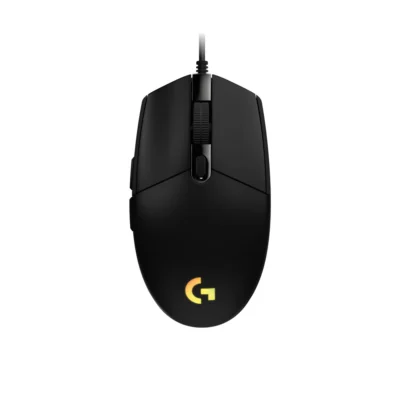 Logitech G102 LIGHTSYNC
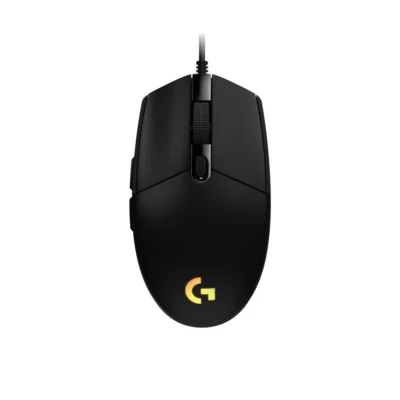 Logitech G203 LIGHTSYNC
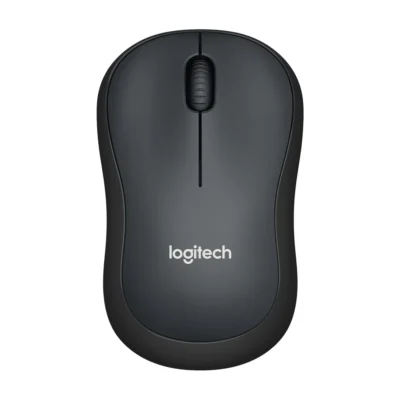 Logitech M221 Wireless Mouse
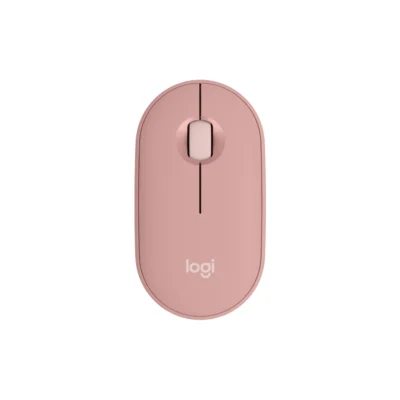 Logitech Pebble Mouse 2 M350s
| Specification | Logitech G102 LIGHTSYNC | Logitech G203 LIGHTSYNC | Logitech M221 Wireless Mouse | Logitech Pebble Mouse 2 M350s |
|---|---|---|---|---|
| Brand | Logitech | Logitech | Logitech | Logitech |
| Model | G102 LIGHTSYNC — Black: 910-005823; White: 910-005824; Blue: 910-005801; Lilac: 910-005854 | G203 LIGHTSYNC — Black: 910-005796; White: 910-005797; Blue: 910-005798 | M221 Silent (910-006510) | Pebble Mouse 2 M350s — Tonal Rose: 910-007014; Tonal Graphite: 910-007015; Tonal White: 910-007013 |
| Type | Gaming mouse | Gaming mouse | Productivity mouse | Productivity mouse |
| Color | Black; White; Blue; Lilac | Black; White; Blue | Charcoal | Tonal Rose; Tonal Graphite; Tonal White |
| Specification | Logitech G102 LIGHTSYNC | Logitech G203 LIGHTSYNC | Logitech M221 Wireless Mouse | Logitech Pebble Mouse 2 M350s |
|---|---|---|---|---|
| DPI | 200 – 8,000 DPI | 200 – 8,000 DPI | 1,000 DPI | 400-4000 dpi (Fully adjustable with 100DPI increments) |
| Polling Rate | 1000Hz (1ms) | 1000Hz (1ms) | Not specified | Not specified |
| Sensor Technology | Not specified | Not specified | Optical tracking | High-precision optical tracking |
| Specification | Logitech G102 LIGHTSYNC | Logitech G203 LIGHTSYNC | Logitech M221 Wireless Mouse | Logitech Pebble Mouse 2 M350s |
|---|---|---|---|---|
| Number of Buttons | 6 | 6 | 3 | 3 |
| Programmable Buttons | 6 | 6 | Not specified | Not specified |
| Scroll Wheel | Not specified | Not specified | Line-by-line mechanical scrolling | Not specified |
| Specification | Logitech G102 LIGHTSYNC | Logitech G203 LIGHTSYNC | Logitech M221 Wireless Mouse | Logitech Pebble Mouse 2 M350s |
|---|---|---|---|---|
| Connection Type | Wired USB | Wired USB | 2.4 GHz wireless USB receiver | Bluetooth Low Energy; optional Logi Bolt receiver |
| Bluetooth | No | No | No | Bluetooth Low Energy |
| Cable / Connector | USB-A | USB-A | Not specified | Not specified |
| Cable Length | 2.1 m | 2.1 m | Not specified | Not specified |
| Wireless Receiver | Not specified | Not specified | USB nano receiver included | Logi Bolt compatible; receiver not included |
| Wireless Range | Not specified | Not specified | Up to 10 m | 10 m |
| Multi-Device Connection | Not specified | Not specified | Not specified | Up to three devices |
| Specification | Logitech G102 LIGHTSYNC | Logitech G203 LIGHTSYNC | Logitech M221 Wireless Mouse | Logitech Pebble Mouse 2 M350s |
|---|---|---|---|---|
| Battery Type | USB powered | USB powered | One AA battery | 1 AA battery (Alkaline Battery) |
| Battery Life | No battery | No battery | Up to 18 months | 24 months |
| Specification | Logitech G102 LIGHTSYNC | Logitech G203 LIGHTSYNC | Logitech M221 Wireless Mouse | Logitech Pebble Mouse 2 M350s |
|---|---|---|---|---|
| Customization Software | Logitech G HUB | Logitech G HUB | Not specified | Logi Options+ on Windows and macOS |
| RGB Lighting | LIGHTSYNC RGB | LIGHTSYNC RGB | Not specified | Not specified |
| Silent Clicks | Not specified | Not specified | SilentTouch technology | Not specified |
| Specification | Logitech G102 LIGHTSYNC | Logitech G203 LIGHTSYNC | Logitech M221 Wireless Mouse | Logitech Pebble Mouse 2 M350s |
|---|---|---|---|---|
| Dimensions | 38.2 mm × 62.1 mm × 116.6 mm | 38.2 mm × 62.1 mm × 116.6 mm | 99 mm × 60 mm × 39 mm | 106 mm × 58.7 mm × 26.62 mm |
| Weight | 85 g | 85 g | 75.2 g | 76 g |
| Hand Orientation | Not specified | Not specified | Ambidextrous | Not specified |
| Specification | Logitech G102 LIGHTSYNC | Logitech G203 LIGHTSYNC | Logitech M221 Wireless Mouse | Logitech Pebble Mouse 2 M350s |
|---|---|---|---|---|
| Windows | Windows® 7 or later | Windows® 7 or later | Windows 10/11 or later | Not specified |
| macOS | macOS 10.13 or later | macOS 10.13 or later | macOS 10.5 or later | Not specified |
| Other Operating Systems | Not specified | Not specified | linux: Linux kernel 2.6 or later; chromeos: Supported | Not specified |
| Specification | Logitech G102 LIGHTSYNC | Logitech G203 LIGHTSYNC | Logitech M221 Wireless Mouse | Logitech Pebble Mouse 2 M350s |
|---|---|---|---|---|
| In the Box | G203 LIGHTSYNC; User documentation | G203 LIGHTSYNC; User documentation | Mouse; USB receiver; AA battery; user documentation | Pebble Mouse 2 M350s; 1 x AA Alkaline battery (pre-installed); User documentation; Important Info Document (IID) |
| Brand | Logitech |
|---|---|
| Model | G102 LIGHTSYNC — Black: 910-005823; White: 910-005824; Blue: 910-005801; Lilac: 910-005854 |
| Type | Gaming mouse |
| Color | Black; White; Blue; Lilac |
| Dimensions | 38.2 mm × 62.1 mm × 116.6 mm |
| Weight | 85 g |
| DPI | 200 – 8,000 DPI |
|---|---|
| Polling Rate | 1000Hz (1ms) |
| Number of Buttons | 6 |
|---|---|
| Programmable Buttons | 6 |
| Connection Type | Wired USB |
|---|---|
| Bluetooth | No |
| Cable / Connector | USB-A |
| Cable Length | 2.1 m |
| Customization Software | Logitech G HUB |
|---|---|
| RGB Lighting | LIGHTSYNC RGB |
| Windows | Windows® 7 or later |
|---|---|
| macOS | macOS 10.13 or later |
| In the Box | G203 LIGHTSYNC; User documentation |
|---|
We are here to serve you
Write a Review