Skip to content
SKU: 920-009406 Category: Brand:

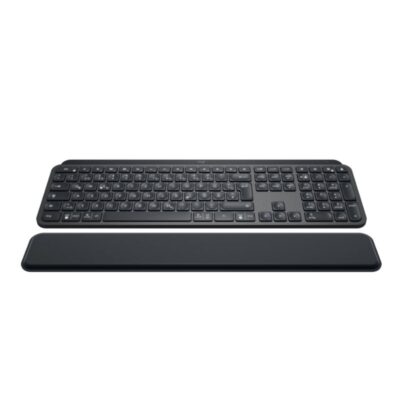
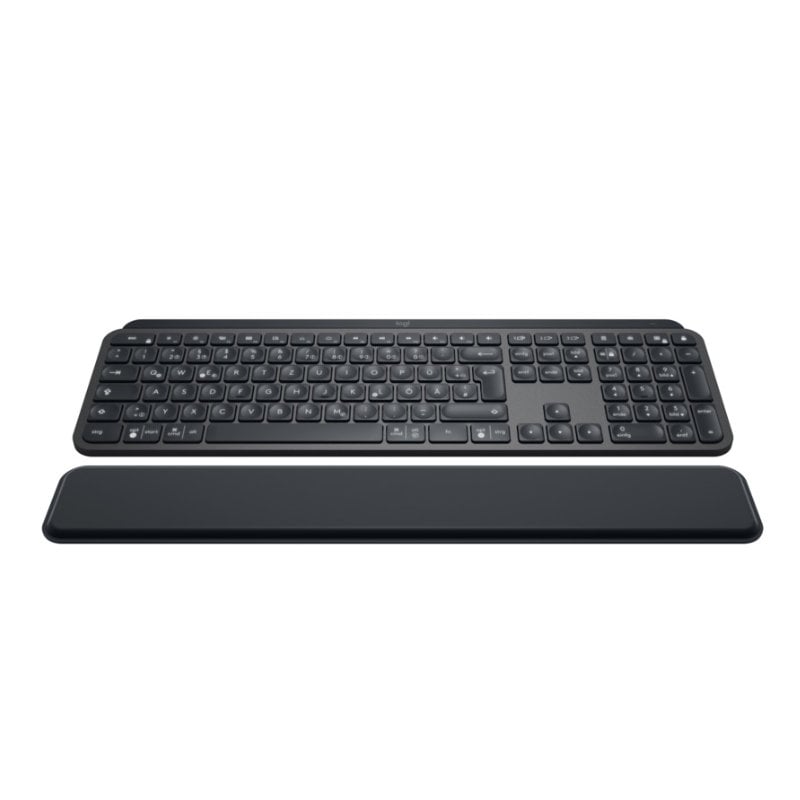
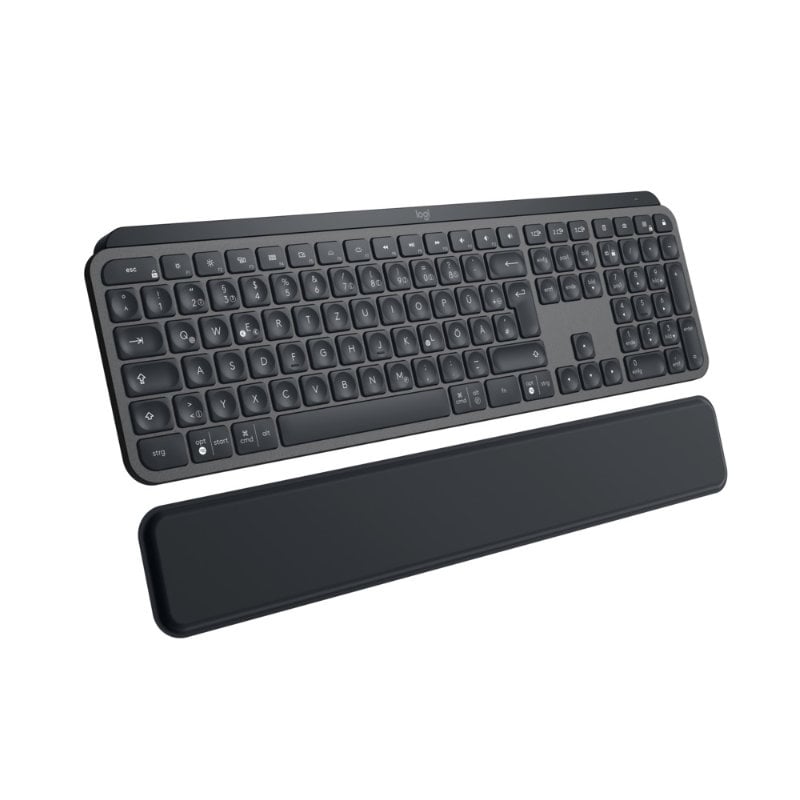
Logitech MX Keys Plus

0 Reviews
In stock

KSh 19,000

 Specifications

  • Connectivity: Bluetooth Low Energy & 2.4 GHz Unifying USB Receiver.
  • Multi-Device: Pair up to 3 devices (Easy-Switch keys)
  • Backlighting: Smart auto-adjusting (Hand proximity + Ambient light sensors).
  • Range: 10 meters (33 feet).
  • Battery: Rechargeable Li-Po (1500 mAh).
  • Charging Port: USB-C.
  • Keys: Spherically dished, matte coating.
  • Palm Rest: Detachable memory foam (Included).
  • Compatibility: Windows, macOS, Linux, iOS, Android.
  • Dimensions: 131.63 x 430.2 x 20.5 mm (Keyboard).
GENUINE 100% Original
M-PESA Secure Pay
DELIVERY Fast Dispatch
SUPPORT Expert Help
Brand:

Product details

Logitech MX Keys Plus Wireless Keyboard Price in Kenya

The Logitech MX Keys Plus price in Kenya is Ksh 19,000. This is the ultimate precision instrument for Nairobi’s coders, analysts, and creative professionals who spend their days (and nights) mastering complex workflows. While the standard MX Keys is impressive, the “Plus” version adds a premium, detachable palm rest, so that your hands remain in a natural, relaxed position during marathon typing sessions.

Relentlessly engineered for stability and tactile feedback, the MX Keys Plus features spherically dished keys that match the shape of your fingertips. Every stroke is quiet, fluid, and remarkably precise. With smart backlighting that reacts to your presence and multi-device pairing that spans up to three different operating systems, it is the cornerstone of a high-performance desk setup.

The #1 lifestyle upgrade here is Seamless Cross-Computer Flow. When used with a Logitech Flow-enabled mouse (like the MX Master 3S), you can type on one computer and move to another just by moving your cursor, even copying and pasting text and files between a Mac and a Windows PC.

Buy it today at Exelic Gadgets. We offer same-day delivery in Nairobi (within 2 hours) and secure nationwide shipping to Mombasa, Kisumu, and Eldoret via Wells Fargo or G4S.

Why You’ll Love It (The Lifestyle Upgrade)

  • Perfect Stroke Typing: Spherically dished keys match your fingertips, so that every keystroke feels natural, fast, and remarkably accurate.
  • Ergonomic Support: Includes a premium, detachable palm rest made of high-quality memory foam, so that you can type for hours without wrist fatigue.
  • Smart Illumination: Proximity sensors detect your hands and turn the backlight on instantly, so that the keys are always visible when you need them and save power when you don’t.
  • Multi-Device Mastery: Pair with up to three devices via Bluetooth or the Unifying receiver, so that you can switch between your laptop, tablet, and smartphone with a single tap.
  • Remarkable Stability: The entire keyboard body is held together by a single metal plate, so that it never slides around your desk, no matter how fast you type
  • USB-C Quick Charging: A full charge lasts up to 10 days (with backlighting) or up to 5 months (without), so that you spend more time working and less time plugged into a wall.

Logitech MX Keys Plus Specifications

Feature Details
Price in Kenya Ksh 19,000
Full Charge Life Up to 10 Days (Backlit) / 5 Months (Off)
Palm Rest Dimensions 64 x 420 x 8 mm
Weight 810g (Keyboard) / 180g (Palm Rest)
Software Support Logi Options+ (Windows/macOS)
Customization Programmable F-Keys & Shortcuts
Flow Support Yes (Type across multiple computers)
Indicators Caps Lock, Battery LED
On/Off Switch Yes
Build Quality Single metal plate frame
Warranty 1-Year Limited Hardware Warranty

Spherically Dished Keys: The “Fingertip Fit”

Unlike flat keys found on cheap keyboards, the MX Keys Plus features a subtle circular dip in every keycap. This “Fingertip Fit” naturally guides your fingers to the center of the key, significantly reducing “fat-fingered” mistypes. For developers writing thousands of lines of code, this subtle ergonomic shift translates to fewer errors and a faster “flow state.”

Smart Illumination: The “Presence Sensor”

The keyboard doesn’t just stay lit; it watches you. Using proximity sensors, the backlighting only glows when it senses your hands approaching. It also uses an ambient light sensor to check the room’s brightness—dimming the lights in a bright Westlands office and brightening them during a late-night session in a dark study. This keeps the battery lasting for months rather than days.

Perfect Stroke Technology: Silent but Tactile

Logitech spent decades perfecting the “scissorkeys” mechanism. The result is a keystroke that is nearly silent (perfect for open-plan offices) but provides a distinct tactile “bump” that tells your brain the key has been registered. It’s the precision of a mechanical keyboard without the loud “clicky” distraction

The “Plus” Palm Rest: Memory Foam Comfort

The palm rest included with the MX Keys Plus isn’t just a piece of plastic. It’s a firm yet comfortable support made of high-density memory foam wrapped in a stain-resistant leatherette. It doesn’t attach with flimsy clips; it sits independently, allowing you to position it at the exact distance your wrists require for optimal posture.

Logi Options+ & Smart Actions: The “Macro” Engine

With the Logi Options+ app, you can turn your F-keys into a “command center.” You can set “Smart Actions”—macros that perform multiple tasks with one tap. For example, one button can simultaneously open your Email, Slack, and your “Focus” Spotify playlist, saving you minutes of repetitive clicking every morning.

Who Is This perfect For?

  • The “Full-Stack” Developer: You work across different OS environments (Mac for dev, Windows for testing). The ability to switch between three devices and use Flow to move files is a massive productivity hack.
  • The Financial Analyst: You spend hours on Excel. The dedicated numpad and the stability of the metal-backed frame make entering data fast and satisfying.
  • The Remote Creative: You value aesthetics and performance. The sleek, low-profile design of the MX Keys Plus complements a modern home office while providing the professional tools needed for high-level editing and design work.

Alternatives & Competitors

  • Logitech MX Keys S: The standalone keyboard (no palm rest included).
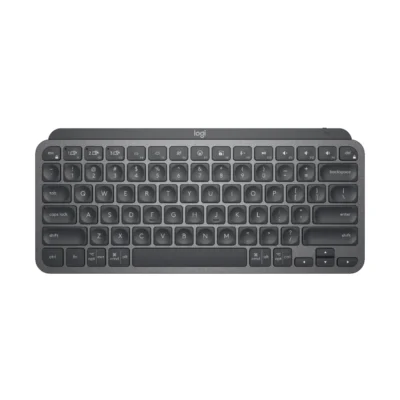
  • Logitech MX Keys Mini: Space-saving version without the numpad.
  • Apple Magic Keyboard with Numpad: The native Mac alternative (lacks multi-device switching).
  • Logitech MX Mechanical: If you prefer the deep travel and “click” of mechanical switches.

Frequently Asked Questions (FAQs)

1. Does it work with the iPad?

Yes, it is fully compatible with iPadOS via Bluetooth. You can even use the Easy-Switch keys to jump from your MacBook to your iPad instantly.

2. Can I use it while it’s charging?

Yes. You can plug the USB-C cable into your computer and continue typing while the battery refilled.

3. Is the palm rest attached to the keyboard?

No, it is a separate, standalone unit. This gives you the flexibility to place it exactly where it feels best for your hand size or move it out of the way when not needed.

4. How do I switch between my Windows PC and Mac?

You simply tap one of the three “Easy-Switch” keys located above the Ins/Home/PgUp section. The keyboard re-maps its layout (Command vs. Ctrl) automatically.

5. Is this the same as the MX Keys S Plus?

The MX Keys S is a newer revision with slightly updated “Smart Actions” and a different charging cable, but the core typing experience and the “Plus” palm rest remain essentially the same.

Compare Logitech MX Keys Plus with Similar Products

Compare Logitech MX Keys Plus specs, features and price with similar keyboards and alternatives.

Compare Logitech MX Keys Plus with Similar Products
Selected Item
Logitech MX Keys PlusKSh 19,000Add to cart

General

General specifications comparison
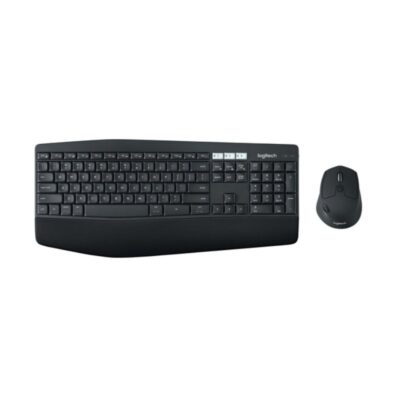
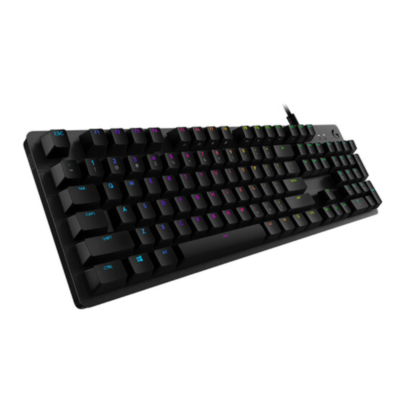
SpecificationLogitech MX Keys PlusLogitech MK850Logitech MX Keys MiniLogitech G512
BrandLogitechLogitechLogitechNot specified
ModelMX Keys PlusMK850 PerformanceMX Keys MiniG512 Carbon
Announced2019201720212018
TypeWireless illuminated keyboardWireless keyboard and mouse comboWireless illuminated keyboardWired mechanical gaming keyboard
LayoutFull-sizeFull-size ergonomicCompact 75%Full-size
ColorGraphiteGraphiteGraphite; Pale Gray; RoseCarbon
MaterialAluminum top plate with plastic basePlastic with cushioned palm restAluminum top plate with plastic base5052 aluminum-magnesium alloy top case

Keys & Switches

Keys & Switches specifications comparison
SpecificationLogitech MX Keys PlusLogitech MK850Logitech MX Keys MiniLogitech G512
Switch TypeScissorMembraneScissorMechanical
SwitchesPerfect Stroke spherically dished keysConcave cushioned keysPerfect Stroke spherically dished keysGX mechanical switches
Switch OptionsN/AN/AN/AGX Brown Tactile; GX Red Linear; GX Blue Clicky
Dedicated Multimedia KeysYesYesYesYes — function-key layer
Programmable KeysYes — customizable function keysYesYes — customizable function keysYes
Numeric KeypadYesYesNoYes
Actuation ForceNot specifiedNot specifiedNot specified50 gf
Actuation PointNot specifiedNot specifiedNot specified1.9–2.0 mm depending switch
Total TravelNot specifiedNot specifiedNot specified4.0 mm
Key RolloverNot specifiedNot specifiedNot specified26-key rollover
Anti-GhostingNot specifiedNot specifiedNot specifiedYes

Connectivity

Connectivity specifications comparison
SpecificationLogitech MX Keys PlusLogitech MK850Logitech MX Keys MiniLogitech G512
Connection TypeWirelessWirelessWirelessWired
Wireless TechnologyBluetooth Low Energy; Logitech Unifying 2.4GHzBluetooth Smart; Logitech Unifying 2.4GHzBluetooth Low Energy; Logi Bolt compatibleN/A
BluetoothBluetooth Low EnergyBluetooth SmartBluetooth Low EnergyN/A
Wireless ReceiverLogitech Unifying USB-A receiverLogitech Unifying USB-A receiverLogi Bolt receiver supported; not includedN/A
Multi-Device ConnectionYes — up to 3 devicesYes — up to 3 devicesYes — up to 3 devicesN/A
Wireless RangeUp to 10 mUp to 10 mUp to 10 mN/A
ConnectorUSB-CN/AUSB-CDual USB-A
CableUSB-C charging cableN/AUSB-C charging cableFixed braided cable with USB pass-through lead
Cable LengthNot specifiedN/ANot specified1.8 m

Battery & Power

Battery & Power specifications comparison
SpecificationLogitech MX Keys PlusLogitech MK850Logitech MX Keys MiniLogitech G512
Battery TypeRechargeable Li-Po battery2 × AAA batteriesRechargeable Li-Po batteryN/A
Battery Capacity1,500 mAhN/A1,500 mAhN/A
Battery LifeUp to 10 days with backlighting; up to 5 months withoutUp to 36 monthsUp to 10 days with backlighting; up to 5 months withoutN/A
Charging PortUSB-CN/AUSB-CN/A
Power SwitchYesYesYesN/A
Battery IndicatorYesYesYesN/A
Charging TimeNot specifiedN/ANot specifiedN/A

Lighting & Features

Lighting & Features specifications comparison
SpecificationLogitech MX Keys PlusLogitech MK850Logitech MX Keys MiniLogitech G512
BacklightingWhiteNoneWhiteRGB
Lighting TechnologySmart illuminationN/ASmart illuminationLIGHTSYNC RGB per-key lighting
Brightness AdjustmentYesN/AYesYes
Ambient Light SensorYesNoYesNo
Proximity SensorYes — hand proximity sensorNoYes — hand proximity sensorNo
Wrist RestIncluded palm restIntegrated cushioned palm restNoNo
Customization SoftwareLogitech OptionsLogi Options+Logi Options+Logitech G HUB
Onboard MemoryNoNoNoYes
Profiles / MacrosPer-app shortcut customizationPer-app shortcut customizationPer-app shortcut customizationOnboard lighting profile; programmable macros via software
Special FeaturesEasy-Switch; Logitech Flow; auto-adjusting illuminationEasy-Switch; Logitech Flow; adjustable tilt legs; contoured mouse includedEasy-Switch; dictation, emoji and mic-mute keys; Logitech Flow supportUSB 2.0 pass-through; game mode; aluminum top case

System Requirements

System Requirements specifications comparison
SpecificationLogitech MX Keys PlusLogitech MK850Logitech MX Keys MiniLogitech G512
WindowsWindows 7 or laterWindows 7 or laterWindows 10 or laterWindows 7 or later
macOSmacOS 10.11 or latermacOS 10.10 or latermacOS 10.15 or latermacOS 10.11 or later
Other Operating SystemsLinuxChromeOS; Android 5.0 or later; iOS 5 or laterLinux; ChromeOS; iPadOS; AndroidNot specified
Required Port / ConnectionBluetooth Low Energy or available USB-A portBluetooth or USB-A portBluetooth Low Energy or Logi Bolt receiver2 USB-A ports for keyboard and pass-through
SoftwareLogitech Options optionalLogi Options+ optionalLogi Options+ optionalLogitech G HUB optional

What's in the Box

What's in the Box specifications comparison
SpecificationLogitech MX Keys PlusLogitech MK850Logitech MX Keys MiniLogitech G512
In the BoxMX Keys keyboard, Unifying USB receiver, USB-C charging cable, palm rest, documentationK850 keyboard, M720 mouse, Unifying receiver, 2 AAA keyboard batteries, 1 AA mouse battery, documentationMX Keys Mini keyboard, USB-C charging cable, documentationG512 keyboard, keycap puller, alternate gaming keycaps, documentation

Design

Design specifications comparison
SpecificationLogitech MX Keys PlusLogitech MK850Logitech MX Keys MiniLogitech G512
Dimensions430.2 × 131.63 × 20.5 mm430 × 210 × 25 mm295.99 × 131.95 × 20.97 mm445 × 132 × 35.5 mm
Weight810 g733 g with batteries506.4 g1,130 g

Specs

Logitech MX Keys Plus specifications

General

Logitech MX Keys Plus — General
BrandLogitech
ModelMX Keys Plus
Announced2019
TypeWireless illuminated keyboard
LayoutFull-size
ColorGraphite
MaterialAluminum top plate with plastic base
Dimensions430.2 × 131.63 × 20.5 mm
Weight810 g

Keys & Switches

Logitech MX Keys Plus — Keys & Switches
Switch TypeScissor
SwitchesPerfect Stroke spherically dished keys
Switch OptionsN/A
Actuation ForceNot specified
Actuation PointNot specified
Total TravelNot specified
Key RolloverNot specified
Anti-GhostingNot specified
Dedicated Multimedia KeysYes
Programmable KeysYes — customizable function keys
Numeric KeypadYes

Connectivity

Logitech MX Keys Plus — Connectivity
Connection TypeWireless
Wireless TechnologyBluetooth Low Energy; Logitech Unifying 2.4GHz
BluetoothBluetooth Low Energy
Wireless ReceiverLogitech Unifying USB-A receiver
Multi-Device ConnectionYes — up to 3 devices
Wireless RangeUp to 10 m
ConnectorUSB-C
CableUSB-C charging cable
Cable LengthNot specified

Battery & Power

Logitech MX Keys Plus — Battery & Power
Battery TypeRechargeable Li-Po battery
Battery Capacity1,500 mAh
Battery LifeUp to 10 days with backlighting; up to 5 months without
Charging PortUSB-C
Charging TimeNot specified
Power SwitchYes
Battery IndicatorYes

Lighting & Features

Logitech MX Keys Plus — Lighting & Features
BacklightingWhite
Lighting TechnologySmart illumination
Brightness AdjustmentYes
Ambient Light SensorYes
Proximity SensorYes — hand proximity sensor
Wrist RestIncluded palm rest
Customization SoftwareLogitech Options
Onboard MemoryNo
Profiles / MacrosPer-app shortcut customization
Special FeaturesEasy-Switch; Logitech Flow; auto-adjusting illumination

System Requirements

Logitech MX Keys Plus — System Requirements
WindowsWindows 7 or later
macOSmacOS 10.11 or later
Other Operating SystemsLinux
Required Port / ConnectionBluetooth Low Energy or available USB-A port
SoftwareLogitech Options optional

What's in the Box

Logitech MX Keys Plus — What's in the Box
In the BoxMX Keys keyboard, Unifying USB receiver, USB-C charging cable, palm rest, documentation

0 Reviews

No reviews yet

Be the first to review Logitech MX Keys Plus.

Write a review
Back to Top

My Cart