Skip to content
Category: Tag: Brand:

Logitech MX Vertical Mouse

0 Reviews
In stock

KSh 16,500

Specifications

  • Sensor Resolution: 400 to 4,000 DPI (Adjustable in 50 DPI increments).
  • Vertical Angle: 57° (Fixed).
  • Buttons: 4 Customizable buttons (Back, Forward, DPI switch, Middle click).
  • Connectivity: Bluetooth Low Energy, Unifying Receiver, or USB-C Wired.
  • Wireless Range: 10 meters (33 feet).
  • Battery: Rechargeable Li-Po (240 mAh).
  • Battery Life: Up to 4 months on a full charge.
  • Quick Charge: 1 minute of charging = 3 hours of use.
  • Weight: 135 grams.
  • Compatibility: Windows 10+, macOS 10.15+, iPadOS 13.4+, Linux, ChromeOS.
GENUINE 100% Original
M-PESA Secure Pay
DELIVERY Fast Dispatch
SUPPORT Expert Help
Brand:

Product details

Logitech MX Vertical Wireless Mouse Price in Kenya

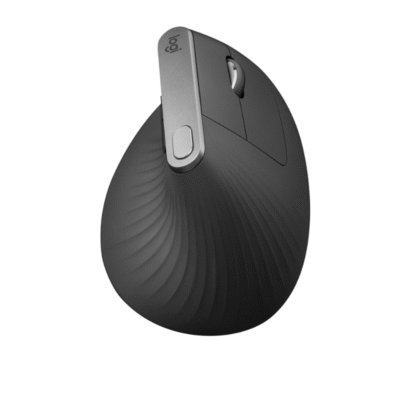
The Logitech MX Vertical price in Kenya is Ksh 16,500. This isn’t just a peripheral; it’s a science-backed ergonomic intervention for Nairobi’s power users who suffer from wrist fatigue or RSI (Repetitive Strain Injury). Designed with a unique 57° vertical angle, it places your hand in a “natural handshake position,” which is proven to reduce muscular strain by 10% and lower pressure on your wrist.

Unlike standard mice that force your forearm to twist, the MX Vertical keeps your anatomy neutral, so that you can work through 10-hour coding sessions or data analysis without the typical “burning” sensation in your forearm. It combines this health-first design with the premium performance of the MX series, featuring a 4,000 DPI high-precision sensor that requires 4x less hand movement to traverse your screen.

Buy it today at Exelic Gadgets. We provide same-day delivery in Nairobi and secure countrywide shipping via Wells Fargo or G4S to Kisumu, Mombasa, Nakuru, and Eldoret.

Why You’ll Love It (The Lifestyle Upgrade)

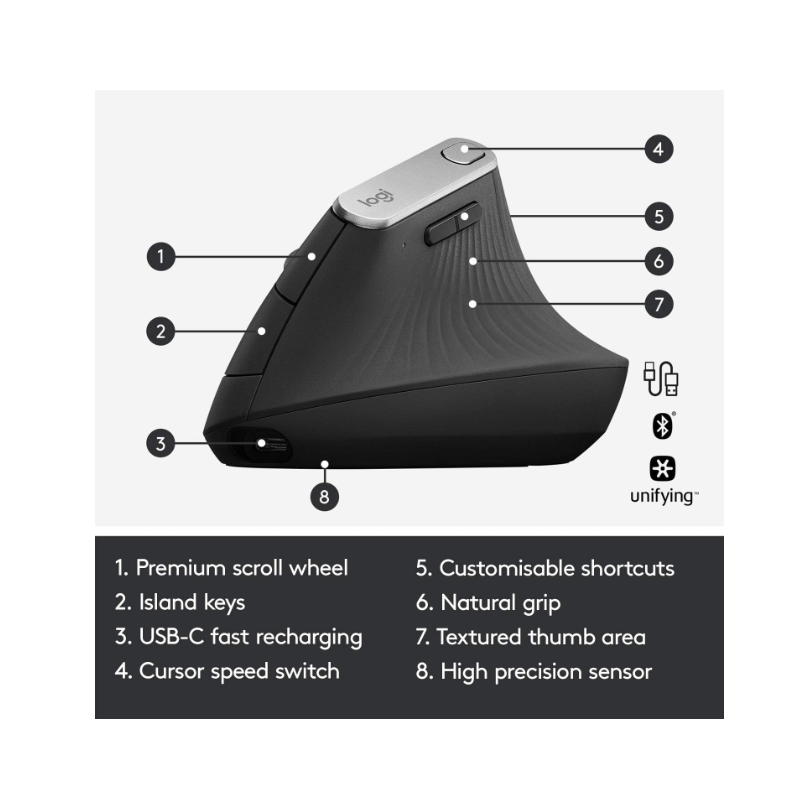
  • Science-Driven Comfort: The 57° vertical angle promotes a natural handshake posture, so that you significantly reduce muscle tension and wrist pressure.
  • Effortless Control: The high-precision sensor reduces the physical distance your hand needs to travel, so that you experience less fatigue throughout the day.
  • Premium Tactile Grip: Features a textured rubber surface shaped for the human hand, so that you have a solid, natural grip that is smooth to the touch
  • Fast USB-C Recharging: Stay powered for up to 4 months on a full charge, so that you rarely have to think about the battery. A 1-minute quick charge gives you 3 hours of use.
  • Master Multiple Devices: Pair with up to 3 computers and switch between them at the tap of a button, so that your workflow between a laptop and desktop is seamless.
  • Logitech Flow Enabled: Move your cursor across screens and even copy-paste text or files between computers, so that you can move data without needing a flash drive.

Logitech MX Vertical Specifications

Feature Details
Price in Kenya Ksh 21,500
Ergonomist Tested Approved by leading ergonomists
Cursor Speed Switch Top-mounted dedicated button
Scroll Wheel Precision wheel with middle click
Onboard Memory Yes (Custom profiles via Logi Options+)
Charging Port USB-C (Cable included)
Finish Graphite (Textured Rubber)
Dimensions 78.5 x 79 x 120 mm
Tracking Type High-precision Optical
Warranty 1-Year Limited Hardware Warranty

57° Vertical Angle: The Anatomy of Comfort

Most mice force your hand into a “pronated” position (palm flat), which crosses the two bones in your forearm. The 57° angle of the MX Vertical is the specific “sweet spot” identified by Logitech’s Ergo Lab. It keeps the radius and ulna bones uncrossed, which reduces the muscular activity required to move the mouse by 10% compared to a traditional non-vertical mouse.

4,000 DPI Precision: Movement Efficiency

In ergonomic circles, “less is more.” By equipping the MX Vertical with a high-end 4,000 DPI sensor, Logitech ensures that a tiny twitch of your hand moves the cursor across a 4K monitor. This reduces the gross motor movement of your arm, which is the primary cause of shoulder and neck tension during long workdays.

Smart Actions & Logi Options+

With the Logi Options+ app, you can turn the MX Vertical into a productivity hub. You can assign Smart Actions to the side buttons—for example, one click could open your browser, Slack, and your calendar simultaneously. You can also customize the top button to act as a “Precision Mode” toggle, instantly slowing down the cursor for pixel-perfect design work.

Triple Connectivity: Bolt, Bluetooth, and Cable

The MX Vertical gives you three ways to connect. It is one of the few premium mice that can operate as a fully wired mouse while charging via the USB-C cable. It also includes the Unifying Receiver for high-security environments and Bluetooth Low Energy for connecting to iPads and laptops on the go.

Who Is This Perfect For?

  • The Sufferer of Wrist Pain: If you feel a dull ache in your wrist after a few hours of work, this is the most effective hardware change you can make.
  • The Software Developer/Data Analyst: For those who spend 8-12 hours a day on a computer, the reduced muscle strain pays off in long-term health and focus.
  • The Large-Handed Professional: The “Lift” (the smaller vertical version) is often too small for many users; the MX Vertical is specifically designed for medium to large hand sizes.

Alternatives & Competitors

  • Logitech Lift Vertical: A smaller, quieter version for small-to-medium hands (uses AA batteries).
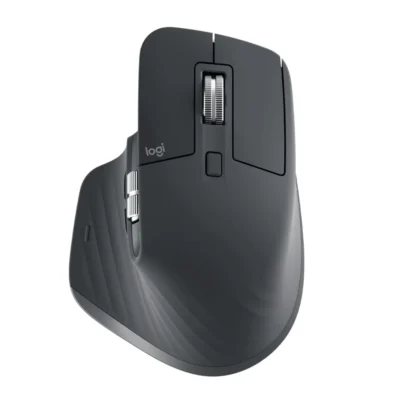
  • Logitech MX Master 3S: The flagship “horizontal” mouse; better for scrolling (MagSpeed wheel) but less focus on wrist angle.
  • Microsoft Ergonomic Mouse: A budget-friendly wired alternative.

Frequently Asked Questions (FAQs)

1. Is there a learning curve?

Yes. Because you are using different muscles, it usually takes 2 to 3 days for your brain to adjust to the vertical orientation. Once you adapt, most users find it difficult to ever go back to a “flat” mouse.

2. Can it be used for gaming?

While the sensor is highly accurate, the vertical orientation is not ideal for competitive FPS games where “flick” movements are required. However, for casual gaming or strategy games (SimCity, Civilization), it works perfectly.

3. Does it have a side scroll wheel?

No. Unlike the MX Master 3S, the MX Vertical lacks a dedicated thumb wheel. However, you can program the side buttons to perform horizontal scrolling when held down.

4. How do I know when to charge it?

The LED indicator on top of the mouse will glow red when the battery is low. You can also see the exact percentage inside the Logi Options+ software.

5. Does it work on glass desks?

Yes, but the glass must be at least 4mm thick for the high-precision sensor to track accurately without a mouse pad.


Buy the latest Mouse in Kenya at Exelic Gadgets.
 

Compare Logitech MX Vertical Mouse with Similar Products

Compare Logitech MX Vertical Mouse specs, features and price with similar computer mice and alternatives.

Compare Logitech MX Vertical Mouse with Similar Products

General

General specifications comparison
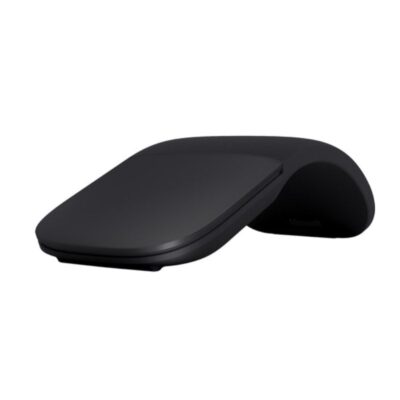
SpecificationLogitech MX Vertical MouseLogitech MX Master 4Microsoft Arc Wireless MouseLogitech MX Master 3S
BrandLogitechLogitechMicrosoftLogitech
ModelMX VerticalMX Master 4 (MR0118)Surface Arc Mouse (ELG-00001)MX Master 3S (M-R0077)
Announced2018202520172022
TypeWireless vertical ergonomic mouseWireless productivity mouseBluetooth snap-flat mouseWireless productivity mouse
ColorGraphiteGraphite; Pale GreyLight GreyGraphite; Pale Grey

Sensor & Tracking

Sensor & Tracking specifications comparison
SpecificationLogitech MX Vertical MouseLogitech MX Master 4Microsoft Arc Wireless MouseLogitech MX Master 3S
Sensor TechnologyHigh-precision optical sensorDarkfield high-precision optical sensorMicrosoft BlueTrack TechnologyDarkfield high-precision optical sensor
DPI400–4,000 DPI; nominal 1,000 / 1,600 DPI200–8,000 DPI1000 DPI200–8,000 DPI
DPI AdjustmentYes — cursor-speed switch and Logi Options+Yes — adjustable in 50-DPI incrementsNoYes — adjustable in 50-DPI increments
Polling RateNot specified125 HzNot specified125 Hz
Tracking SpeedNot specifiedNot specified30 in/sNot specified

Buttons & Scrolling

Buttons & Scrolling specifications comparison
SpecificationLogitech MX Vertical MouseLogitech MX Master 4Microsoft Arc Wireless MouseLogitech MX Master 3S
Number of Buttons4 customizable buttons plus left/right click and scroll wheel8 physical controls27
Programmable ButtonsYes — 4 customizable buttonsYes — via Logi Options+NoYes — via Logi Options+
Gesture ButtonN/AYesN/AYes
Scroll WheelPrecision scroll wheelMagSpeed electromagnetic Smartshift wheelFull scroll plane touch surfaceMagSpeed electromagnetic Smartshift wheel
Horizontal ScrollNoYesYesYes
Thumb WheelN/AYesN/AYes
Button / Switch TypeMechanicalQuiet mechanical clicks with haptic Sense PanelMechanical click with capacitive touch scrollingQuiet mechanical clicks

Connectivity

Connectivity specifications comparison
SpecificationLogitech MX Vertical MouseLogitech MX Master 4Microsoft Arc Wireless MouseLogitech MX Master 3S
Connection TypeWirelessWirelessWirelessWireless
Wireless TechnologyBluetooth Low Energy; Logitech Unifying 2.4GHzBluetooth Low Energy; Logi BoltBluetooth Low EnergyBluetooth Low Energy; Logi Bolt
BluetoothBluetooth Low EnergyBluetooth Low EnergyBluetooth 4.1Bluetooth Low Energy
Wireless ReceiverUSB-A Logitech Unifying receiverLogi Bolt USB-C receiver (CU0028)N/AUSB-A Logi Bolt receiver
Wireless RangeUp to 10 mUp to 10 mUp to 10 m in open air; up to 5 m in office environmentsUp to 10 m
Multi-Device ConnectionYes — up to 3 devicesYes — up to 3 devicesNoYes — up to 3 devices
Cable / ConnectorUSB-C charging/data cableUSB-C to USB-C charging cableN/AUSB-C charging cable
Cable LengthNot specifiedNot specifiedN/ANot specified

Battery & Power

Battery & Power specifications comparison
SpecificationLogitech MX Vertical MouseLogitech MX Master 4Microsoft Arc Wireless MouseLogitech MX Master 3S
Battery TypeRechargeable Li-PoRechargeable Li-Po2 × AAA batteriesRechargeable Li-Po
Battery Capacity240 mAh650 mAhN/A500 mAh
Battery LifeUp to 4 monthsUp to 70 daysUp to 6 monthsUp to 70 days
Charging PortUSB-CUSB-CN/AUSB-C
Fast Charging1 minute provides up to 3 hours of use1 minute provides up to 3 hours of useN/A1 minute provides up to 3 hours; 3 minutes provides up to 1 day
Wireless ChargingNoNoN/ANo
Charging TimeNot specifiedNot specifiedN/AAbout 2 hours

Features

Features specifications comparison
SpecificationLogitech MX Vertical MouseLogitech MX Master 4Microsoft Arc Wireless MouseLogitech MX Master 3S
Customization SoftwareLogi Options+Logi Options+; Logi TuneMicrosoft Mouse and Keyboard CenterLogi Options+
Onboard MemoryNoNoNoNo
ProfilesApplication-specific software profilesSoftware profiles in Logi Options+N/AApplication-specific software profiles
RGB LightingNoNoNoNo
Haptic FeedbackNoYes — customizable Sense Panel hapticsNoNo
Silent ClicksNoYesNoYes — Quiet Clicks
Special Features57-degree natural handshake angle; Easy-Switch; Logitech Flow; cursor-speed switchHaptic Sense Panel; Actions Ring; MagSpeed scrolling; Easy-Switch; Logitech FlowSnaps flat to power off; curves to power on; full vertical and horizontal touch scrollingMagSpeed scrolling; Easy-Switch; Logitech Flow; 8K DPI glass tracking

Design

Design specifications comparison
SpecificationLogitech MX Vertical MouseLogitech MX Master 4Microsoft Arc Wireless MouseLogitech MX Master 3S
Dimensions120 × 79 × 78.5 mm128.2 × 88.4 × 50.8 mm131 × 55 × 14 mm (flat)124.9 × 84.3 × 51 mm
Weight135 g150 g82.5 g (with batteries)141 g
Hand OrientationRight-handedRight-handedNot specifiedRight-handed
Form FactorVertical ergonomic mouseErgonomic productivity mouseSnap-flat portable mouseErgonomic productivity mouse
Grip StylePalmPalmFingertipPalm
MaterialPlastic with textured rubber surfacePlastic with textured rubber gripPlastic with soft-touch surfacePlastic with textured rubber grip

System Requirements

System Requirements specifications comparison
SpecificationLogitech MX Vertical MouseLogitech MX Master 4Microsoft Arc Wireless MouseLogitech MX Master 3S
WindowsWindows 8 or laterWindows 10, Windows 11 or laterWindows 8, Windows 8.1, Windows 10, Windows 11Windows 10, Windows 11 or later
macOSmacOS 10.13 or latermacOS 12 or laterN/AmacOS 10.15 or later
Other Operating SystemsiPadOS 13.1 or later; Linux (basic functions)ChromeOS; Linux; Android 12 or later; iPadOS 15 or laterNot specifiediPadOS 13.4 or later; ChromeOS; Linux
Required Port / ConnectionUSB-A port, USB-C port or BluetoothBluetooth or USB-C port for Logi Bolt receiverBluetooth 4.0 or laterUSB-A port or Bluetooth
SoftwareLogi Options+ (optional)Logi Options+ (optional); Logi Tune (optional)Microsoft Mouse and Keyboard Center (optional)Logi Options+ (optional)

What's in the Box

What's in the Box specifications comparison
SpecificationLogitech MX Vertical MouseLogitech MX Master 4Microsoft Arc Wireless MouseLogitech MX Master 3S
In the BoxMX Vertical mouse, Logitech Unifying receiver, USB-C charging cable and user documentationMX Master 4 mouse, Logi Bolt USB-C receiver, USB-C charging cable and user documentationSurface Arc Mouse, 2 AAA batteries and user documentationMX Master 3S mouse, Logi Bolt USB receiver, USB-C charging cable and user documentation

Specs

Logitech MX Vertical Mouse specifications

General

Logitech MX Vertical Mouse — General
BrandLogitech
ModelMX Vertical
Announced2018
TypeWireless vertical ergonomic mouse
ColorGraphite
Dimensions120 × 79 × 78.5 mm
Weight135 g

Sensor & Tracking

Logitech MX Vertical Mouse — Sensor & Tracking
Sensor TechnologyHigh-precision optical sensor
DPI400–4,000 DPI; nominal 1,000 / 1,600 DPI
DPI AdjustmentYes — cursor-speed switch and Logi Options+
Tracking SpeedNot specified
AccelerationNot specified
Polling RateNot specified

Buttons & Scrolling

Logitech MX Vertical Mouse — Buttons & Scrolling
Number of Buttons4 customizable buttons plus left/right click and scroll wheel
Programmable ButtonsYes — 4 customizable buttons
Gesture ButtonN/A
Scroll WheelPrecision scroll wheel
Horizontal ScrollNo
Thumb WheelN/A
Button / Switch TypeMechanical

Connectivity

Logitech MX Vertical Mouse — Connectivity
Connection TypeWireless
Wireless TechnologyBluetooth Low Energy; Logitech Unifying 2.4GHz
BluetoothBluetooth Low Energy
Wireless ReceiverUSB-A Logitech Unifying receiver
Wireless RangeUp to 10 m
Multi-Device ConnectionYes — up to 3 devices
Cable / ConnectorUSB-C charging/data cable
Cable LengthNot specified

Battery & Power

Logitech MX Vertical Mouse — Battery & Power
Battery TypeRechargeable Li-Po
Battery Capacity240 mAh
Battery LifeUp to 4 months
Charging PortUSB-C
Charging TimeNot specified
Fast Charging1 minute provides up to 3 hours of use
Wireless ChargingNo

Features

Logitech MX Vertical Mouse — Features
Customization SoftwareLogi Options+
Onboard MemoryNo
ProfilesApplication-specific software profiles
RGB LightingNo
Haptic FeedbackNo
Silent ClicksNo
Special Features57-degree natural handshake angle; Easy-Switch; Logitech Flow; cursor-speed switch

Design

Logitech MX Vertical Mouse — Design
Hand OrientationRight-handed
Form FactorVertical ergonomic mouse
Grip StylePalm
MaterialPlastic with textured rubber surface

System Requirements

Logitech MX Vertical Mouse — System Requirements
WindowsWindows 8 or later
macOSmacOS 10.13 or later
Other Operating SystemsiPadOS 13.1 or later; Linux (basic functions)
Required Port / ConnectionUSB-A port, USB-C port or Bluetooth
SoftwareLogi Options+ (optional)

What's in the Box

Logitech MX Vertical Mouse — What's in the Box
In the BoxMX Vertical mouse, Logitech Unifying receiver, USB-C charging cable and user documentation

0 Reviews

No reviews yet

Be the first to review Logitech MX Vertical Mouse.

Write a review
Back to Top

My Cart