Skip to content
SKU: 920-008181 Category: Brand:

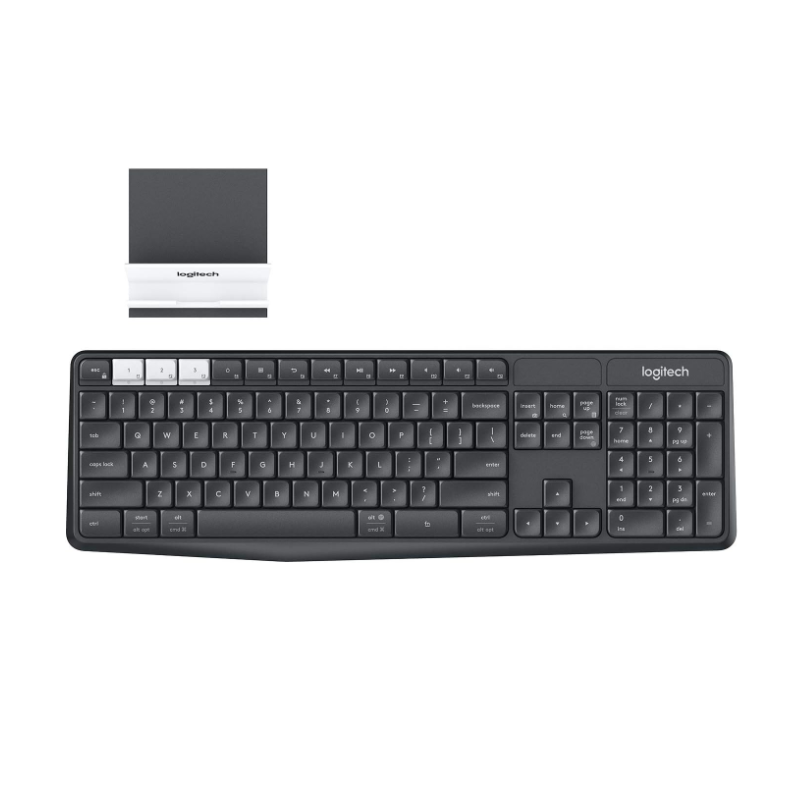
Logitech K375s

0 Reviews
In stock

KSh 7,500

Specifications

  • Connectivity: Bluetooth Smart (BLE) and 2.4 GHz (Unifying Receiver).
  • Multi-Device: Easy-Switch keys for up to 3 paired devices.
  • Battery Life: Up to 24 months (2 x AAA batteries).
  • Wireless Range: 10 meters (33 feet)
  • Keyboard Layout: Full-size with 10-key numeric pad
  • Tilt Legs: Two adjustable typing angles.
  • Durability: Spill-resistant (up to 60ml).
  • Stand Compatibility: Holds most phones and tablets up to 10.5 mm thick.
  • Compatibility: Windows, macOS, ChromeOS, Android, iOS.
  • Dimensions: 435.5 mm x 137.5 mm x 20.5 mm.
GENUINE 100% Original
M-PESA Secure Pay
DELIVERY Fast Dispatch
SUPPORT Expert Help
Brand:

Product details

Logitech K375s Multi-Device Keyboard Price in Kenya

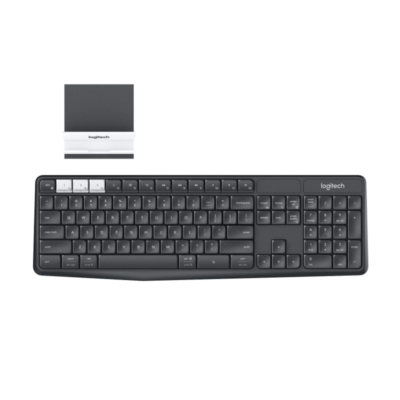
The Logitech K375s price in Kenya is Ksh 7,500. This keyboard is the “multitasker’s dream,” designed for Nairobi professionals who constantly juggle work between a laptop, a smartphone, and a tablet. Instead of picking up your phone to reply to a WhatsApp message, the K375s allows you to Easy-Switch your typing from your computer to your phone at the touch of a button.

The standout feature of this combo is the Universal Phone and Tablet Stand. Included in the box, this sturdy, non-slip stand holds your mobile devices at the perfect angle for reading and typing, effectively turning your smartphone into a mini-workstation. Whether you’re an accountant crunching numbers with the full-size numeric pad or a student attending a virtual lecture, the K375s keeps your desk organized and your workflow fluid.

Buy it today at Exelic Gadgets. We offer same-day delivery in Nairobi (within 2 hours) and secure nationwide shipping via Wells Fargo or G4S to Mombasa, Kisumu, and beyond.

Why You’ll Love It (The Lifestyle Upgrade)

  • One Keyboard for Everything: Pair up to 3 devices simultaneously and switch between them instantly, so that you can finish an email on your PC and reply to a text on your phone without missing a beat.
  • Quiet & Comfortable: Features large, concave keys in a full-size layout, so that you enjoy a familiar, whisper-quiet typing experience that won’t distract others in the office.
  • Included Universal Stand: Comes with a separate stand with a rubber base, so that your phone or tablet stays stable at the ideal viewing angle right next to your monitor.
  • Spill-Resistant Durability: Tested to withstand up to 60ml of liquid spillage, so that an accidental coffee splash won’t derail your workday.
  • Incredible Battery Life: Runs for up to 24 months on two AAA batteries, so that you can go two full years without ever worrying about a replacement.
  • Dual Connectivity: Choose between the tiny Logitech Unifying USB receiver or Bluetooth Smart technology, so that you can connect to almost any device, even those without a USB port

Logitech K375s Specifications

Feature Details
Price in Kenya Ksh 7,500
Key Type Membrane (Quiet, concave)
Special Keys Easy-Switch (F1, F2, F3)
Indicator Lights 3 Bluetooth channel LEDs
On/Off Switch Yes (Conserves battery)
Weight 475g (Keyboard) / 70g (Stand)
Receiver Type Logitech Unifying (Connect up to 6 devices)
Auto-Sleep Yes (Power-saving mode)
Encryption 128-bit AES wireless encryption
Color Graphite/Black
Warranty 1-Year Limited Hardware Warranty


Easy-Switch Technology: The “Device Hopper”

The three white keys (F1, F2, and F3) are the heart of the K375s. They act as “channels.” Channel 1 could be your Windows PC (via USB), Channel 2 your iPad (via Bluetooth), and Channel 3 your Android phone. Switching takes less than two seconds, allowing you to use a single high-quality keyboard for your entire digital ecosystem.

Universal Stand: Ergonomics Beyond the Keys

Most phone stands are flimsy; the Logitech stand included with the K375s is heavy-duty. It features a rubberized grip that won’t scratch your devices and is angled specifically to reduce neck strain. It allows you to see your phone notifications at eye level, so you never have to break your posture to see who is calling.

Logitech Unifying Receiver: The “Six-in-One” USB

If you have a Logitech mouse, you can likely pair it to the same USB receiver that comes with the K375s. This “Unifying” tech saves your precious USB ports, which is a massive advantage for modern laptops that only have one or two ports available.

Spill-Resistant Design: Peace of Mind

Accidents happen. The K375s is built with drainage holes that allow liquid to pass through the keyboard rather than sitting on the sensitive electronics. While you shouldn’t submerge it, it is designed to survive the typical “desk disaster” like a knocked-over glass of water.

Who Is This Perfect For?

  • The Remote Professional: You use a company laptop but want to stay active on your personal social media or messaging apps without having to pick up your phone every 5 minutes.
  • The Accountant / Data Entry Clerk: The full-size layout with a dedicated number pad makes this a vastly superior typing experience compared to cramped laptop keyboards.
  • The Student: You can type your essays on your computer and quickly switch to your tablet to take notes or search for references.

Alternatives & Competitors

  • Logitech K380: More portable and colorful, but lacks the numeric pad and phone stand.
  • Logitech K580: Slimmer and features a built-in cradle for your phone.
  • Logitech MX Keys S: The premium, backlit professional upgrade.
  • Logitech K120: The basic, wired, non-multi-device budget alternative.

Frequently Asked Questions (FAQs)

1. Does it work with the latest iPhones?

Yes. It is fully compatible with all iPhones and iPads running iOS 5 or later via Bluetooth.

2. Can I use it for gaming?

While it is excellent for typing, it is a membrane keyboard designed for productivity. For high-speed gaming (like Valorant), we recommend a dedicated gaming keyboard like the Logitech G213.

3. Is the phone stand attached to the keyboard?

No, it is a separate unit. This is better because it allows you to position your phone anywhere on your desk—even at a distance—to get the best viewing angle.

4. Does it need a driver to work?

It is plug-and-play. However, installing the Logi Options+ software allows you to customize the function keys and check your battery status.

5. How do I switch from Windows to Mac layout?

The keyboard is “dual-labeled” (Alt/Opt and Start/Cmd). It automatically detects which operating system you are connected to and remaps the keys accordingly.

Buy the latest  in Kenya at Exelic Gadgets

Compare Logitech K375s with Similar Products

Compare Logitech K375s specs, features and price with similar keyboards and alternatives.

Compare Logitech K375s with Similar Products
Selected Item
Logitech K375sKSh 7,500Add to cart

General

General specifications comparison
SpecificationLogitech K375sLogitech Pebble Keys 2 K380SLogitech K480Logitech K580
BrandLogitechLogitechLogitechLogitech
ModelK375s Multi-DevicePebble Keys 2 K380sK480 Bluetooth Multi-Device KeyboardK580 Slim Multi-Device
Announced2016202320142019
TypeWireless multi-device keyboardWireless compact keyboardWireless multi-device keyboardWireless slim multi-device keyboard
LayoutFull-sizeCompact 75%Compact 75%Full-size compact
ColorGraphiteTonal Graphite; Tonal White; Tonal Rose; Tonal Sand; Tonal BlueBlack; WhiteGraphite; Off-white; Rose
MaterialPlasticRecycled plastic componentsPlasticPlastic

Keys & Switches

Keys & Switches specifications comparison
SpecificationLogitech K375sLogitech Pebble Keys 2 K380SLogitech K480Logitech K580
Switch TypeMembraneScissorMembraneScissor
SwitchesLow-profile quiet keysLow-profile scooped keysLow-profile keysLow-profile laptop-style keys
Switch OptionsN/AN/AN/AN/A
Dedicated Multimedia KeysYes — function-row shortcutsYes — shortcut rowYes — shortcut rowYes — shortcut row
Programmable KeysNoYes — customizable shortcut keysNoNo
Numeric KeypadYesNoNoYes

Connectivity

Connectivity specifications comparison
SpecificationLogitech K375sLogitech Pebble Keys 2 K380SLogitech K480Logitech K580
Connection TypeWirelessWirelessWirelessWireless
Wireless TechnologyBluetooth Smart; Logitech Unifying 2.4GHzBluetooth Low Energy; Logi Bolt compatibleBluetooth ClassicBluetooth Low Energy; Logitech Unifying 2.4GHz
BluetoothBluetooth SmartBluetooth Low EnergyBluetooth 3.0Bluetooth Low Energy
Wireless ReceiverLogitech Unifying USB-A receiverLogi Bolt receiver supported; not includedN/ALogitech Unifying USB-A receiver
Multi-Device ConnectionYes — up to 3 devicesYes — up to 3 devicesYes — up to 3 devicesYes — up to 2 devices
Wireless RangeUp to 10 mUp to 10 mUp to 10 mUp to 10 m
ConnectorN/AN/AN/AN/A
CableN/AN/AN/AN/A
Cable LengthN/AN/AN/AN/A

Battery & Power

Battery & Power specifications comparison
SpecificationLogitech K375sLogitech Pebble Keys 2 K380SLogitech K480Logitech K580
Battery Type2 × AAA batteries2 × AAA batteries2 × AAA batteries2 × AAA batteries
Battery CapacityN/AN/AN/AN/A
Battery LifeUp to 24 monthsUp to 36 monthsUp to 24 monthsUp to 24 months
Charging PortN/AN/AN/AN/A
Charging TimeN/AN/AN/AN/A
Power SwitchYesYesYesYes
Battery IndicatorYesYesYesYes

Lighting & Features

Lighting & Features specifications comparison
SpecificationLogitech K375sLogitech Pebble Keys 2 K380SLogitech K480Logitech K580
BacklightingNoneNoneNoneNone
Lighting TechnologyN/AN/AN/AN/A
Brightness AdjustmentN/AN/AN/AN/A
Ambient Light SensorNoNoNoNo
Proximity SensorNoNoNoNo
Wrist RestNoNoNoNo
Customization SoftwareNoneLogi Options+NoneNone
Onboard MemoryNoNoNoNo
Profiles / MacrosNoSmart Actions and shortcut customization in softwareNoNo
Special FeaturesEasy-Switch; included universal phone/tablet stand; spill-resistant designEasy-Switch; customizable shortcuts; multi-OS key legendsEasy-Switch dial; integrated phone and tablet cradle; multi-OS keysIntegrated phone cradle; Easy-Switch; OS-adaptive shortcuts

System Requirements

System Requirements specifications comparison
SpecificationLogitech K375sLogitech Pebble Keys 2 K380SLogitech K480Logitech K580
WindowsWindows 7 or laterWindows 10 or laterWindows 10 or laterWindows 10 or later
macOSmacOS 10.10 or latermacOS 11 or latermacOS 10.14 or latermacOS 10.15 or later
Other Operating SystemsChromeOS; Android 5.0 or later; iOS 5 or laterLinux; ChromeOS; iPadOS; iOS; AndroidChromeOS; Android 7 or later; iOS 11 or later; iPadOSChromeOS; Android; iOS; iPadOS
Required Port / ConnectionBluetooth or USB-A portBluetooth Low Energy or Logi Bolt USB receiverBluetoothBluetooth or USB-A port
SoftwareLogitech Options optionalLogi Options+ optionalNoneLogitech Options optional

What's in the Box

What's in the Box specifications comparison
SpecificationLogitech K375sLogitech Pebble Keys 2 K380SLogitech K480Logitech K580
In the BoxK375s keyboard, universal stand, Unifying receiver, 2 AAA batteries, documentationPebble Keys 2 K380s keyboard, 2 AAA batteries, documentationK480 keyboard, 2 AAA batteries, documentationK580 keyboard, Unifying receiver, 2 AAA batteries, documentation

Design

Design specifications comparison
SpecificationLogitech K375sLogitech Pebble Keys 2 K380SLogitech K480Logitech K580
Dimensions435.5 × 137.5 × 20.5 mm279 × 124 × 16 mm299 × 195 × 20 mm373.5 × 143.9 × 21.3 mm
Weight475 g with batteries415 g with batteries820 g with batteries558 g with batteries

Specs

Logitech K375s specifications

General

Logitech K375s — General
BrandLogitech
ModelK375s Multi-Device
Announced2016
TypeWireless multi-device keyboard
LayoutFull-size
ColorGraphite
MaterialPlastic
Dimensions435.5 × 137.5 × 20.5 mm
Weight475 g with batteries

Keys & Switches

Logitech K375s — Keys & Switches
Switch TypeMembrane
SwitchesLow-profile quiet keys
Switch OptionsN/A
Actuation ForceNot specified
Actuation PointNot specified
Total TravelNot specified
Key RolloverNot specified
Anti-GhostingNot specified
Dedicated Multimedia KeysYes — function-row shortcuts
Programmable KeysNo
Numeric KeypadYes

Connectivity

Logitech K375s — Connectivity
Connection TypeWireless
Wireless TechnologyBluetooth Smart; Logitech Unifying 2.4GHz
BluetoothBluetooth Smart
Wireless ReceiverLogitech Unifying USB-A receiver
Multi-Device ConnectionYes — up to 3 devices
Wireless RangeUp to 10 m
ConnectorN/A
CableN/A
Cable LengthN/A

Battery & Power

Logitech K375s — Battery & Power
Battery Type2 × AAA batteries
Battery CapacityN/A
Battery LifeUp to 24 months
Charging PortN/A
Charging TimeN/A
Power SwitchYes
Battery IndicatorYes

Lighting & Features

Logitech K375s — Lighting & Features
BacklightingNone
Lighting TechnologyN/A
Brightness AdjustmentN/A
Ambient Light SensorNo
Proximity SensorNo
Wrist RestNo
Customization SoftwareNone
Onboard MemoryNo
Profiles / MacrosNo
Special FeaturesEasy-Switch; included universal phone/tablet stand; spill-resistant design

System Requirements

Logitech K375s — System Requirements
WindowsWindows 7 or later
macOSmacOS 10.10 or later
Other Operating SystemsChromeOS; Android 5.0 or later; iOS 5 or later
Required Port / ConnectionBluetooth or USB-A port
SoftwareLogitech Options optional

What's in the Box

Logitech K375s — What's in the Box
In the BoxK375s keyboard, universal stand, Unifying receiver, 2 AAA batteries, documentation

0 Reviews

No reviews yet

Be the first to review Logitech K375s.

Write a review
Back to Top

My Cart