Skip to content
SKU: N/A Category: Tag: Brand:

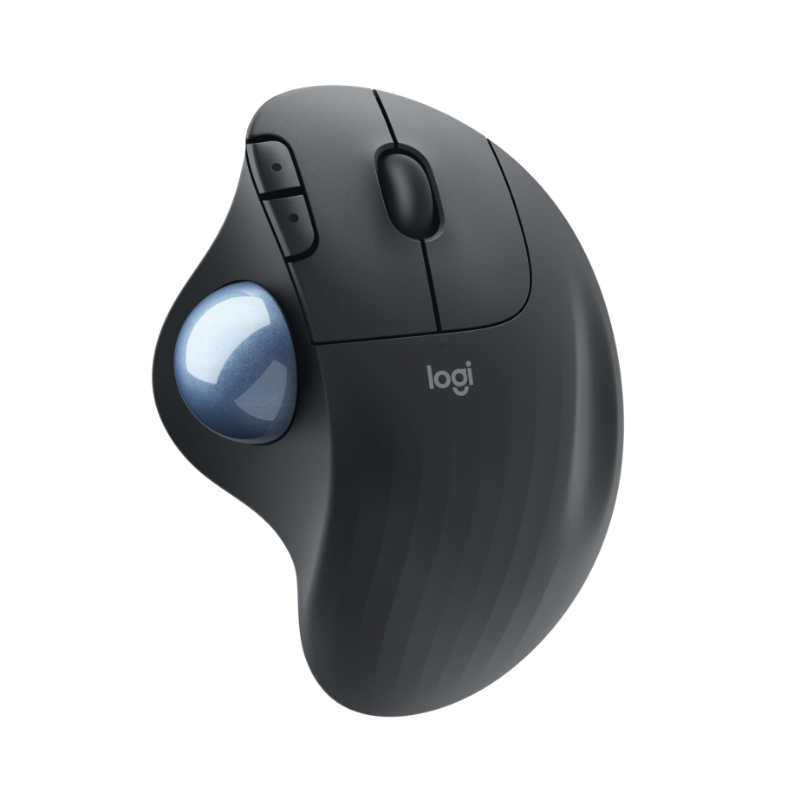
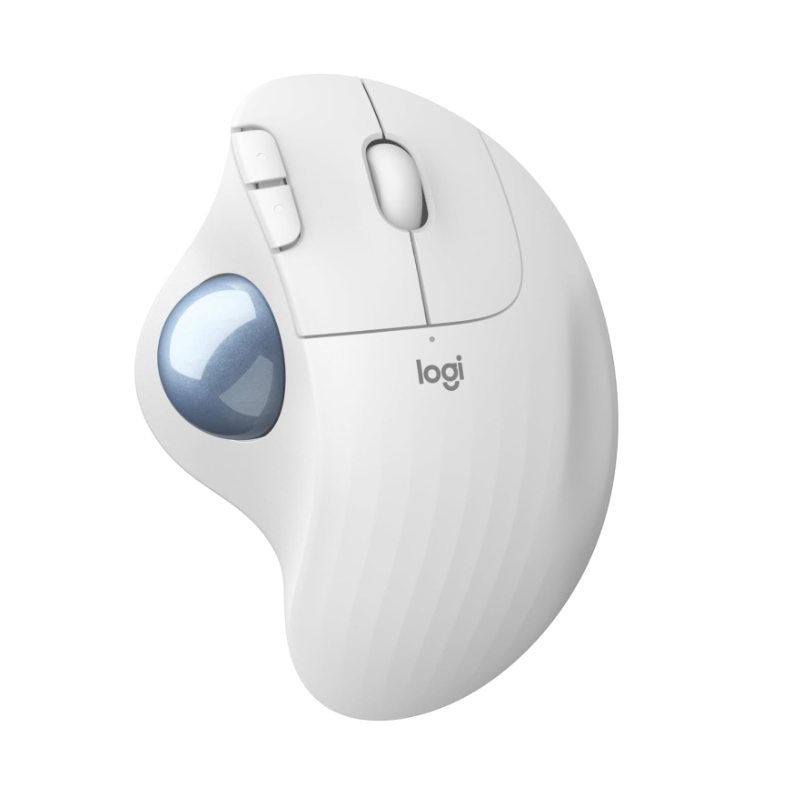
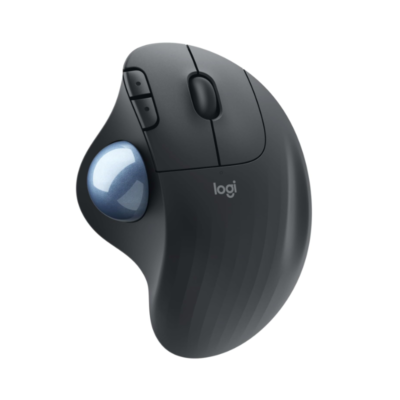
Logitech Ergo M575

0 Reviews
In stock

Specifications

  • Sensor Technology: Logitech Advanced Optical Tracking.
  • DPI Range: 400–2000 dpi (Adjustable in Logi Options+)
  • Number of Buttons: 5 (Left/Right-click, Back/Forward, Scroll-wheel with middle click)
  • Connectivity: Bluetooth Low Energy & 2.4 GHz USB Receiver
  • Wireless Range: 10 meters (33 feet
  • Battery Type: 1 x AA battery (Included)
  • Battery Life: Up to 24 months (USB Receiver) / 20 months (Bluetooth)
  • Hand Orientation: Right-handed
  • Sustainability: Made with 52% post-consumer recycled plastic (Graphite)
  • Dimensions: 134 mm x 100 mm x 48 mm; Weight: 145g

KSh 6,500

GENUINE 100% Original
M-PESA Secure Pay
DELIVERY Fast Dispatch
SUPPORT Expert Help
Brand:

Product details

 Logitech Ergo M575 Wireless Trackball Price in Kenya

The Logitech Ergo M575 price in Kenya is Ksh 6,500 at Exelic Gadgets. This mouse is a total game-changer for Nairobi’s desk warriors who are tired of the “claw grip” and nagging wrist fatigue. Unlike a traditional mouse that forces you to slide your arm across the desk all day, the M575 stays stationary, putting total control in your thumb.

At this price point, you are investing in long-term health and workspace efficiency. It is scientifically designed to reduce muscle strain by 25% compared to a standard mouse, making it the perfect companion for long coding sessions or administrative marathons. Whether you are working from a tiny coffee shop table in Westlands or a cluttered home office, its zero-footprint design fits anywhere

The standout lifestyle upgrade here is the freedom of movement—or rather, the lack of it. Because the mouse doesn’t move, you can use it on your bed, on a sofa, or even on a stack of files without losing an ounce of precision. It’s the ultimate tool for those who value comfort as much as productivity.

Buy the Logitech Ergo M575 today at Exelic Gadgets. We provide same-day delivery within Nairobi and reliable shipping via Wells Fargo or G4S for customers in Mombasa, Nakuru, Eldoret, and across Kenya. Upgrade your desk setup now with M-Pesa for a quick and secure transaction.

Why You’ll Love It (The Lifestyle Upgrade)

  • Zero-Movement Navigation: The stationary design means you only move your thumb, so that you eliminate the repetitive arm and shoulder strain caused by dragging a traditional mouse.
  • Compact Desk Freedom: Since the device never moves, it requires zero “slide room,” so that you have more space for your coffee, notebook, or phone on even the smallest desks.
  • Ergonomist-Approved Shape: The sculpted ergonomic form supports your entire palm naturally, so that your hand stays relaxed even during 8-hour workdays.
  • Surface-Independent Tracking: The high-performance optical sensor works on any surface, so that you can work comfortably from your lap, a wooden table, or even your bed.
  • Dual Wireless Connectivity: Connect via Bluetooth Low Energy or the included Logi Bolt USB receiver, so that you can switch between your laptop and tablet seamlessly.
  • Legendary Battery Life: A single AA battery lasts up to 24 months, so that you can forget about charging cables and low-battery anxiety for up to two years.

Logitech Ergo M575 Specifications

Feature Details
Price Ksh 6,500
Connection Type Bluetooth + 2.4GHz USB Receiver
Tracking Method Thumb-operated Trackball
Max DPI 2000 DPI
Customizable Buttons 3 (using Logi Options+)
Battery Life Up to 2 years
Compatibility Windows, macOS, iPadOS, ChromeOS, Linux
Ergonomic Certification US Ergonomics Certified
Click Type Quiet, tactile clicks
Scroll Wheel Precision mechanical wheel
Weight 145g (including battery)
Warranty 1 Year Limited Hardware

Thumb-Controlled Precision

Traditional mice rely on your wrist and elbow to move the cursor. The Ergo M575 flips this by using a high-performance optical sensor focused on the trackball itself. Think of it like a high-end joystick for your thumb; you rotate the ball to move the cursor. In the context of a busy Nairobi office, this means you aren’t constantly bumping into your keyboard or coffee mug while trying to navigate a large spreadsheet.

RightLight & Power Efficiency

Logitech has optimized the optical sensor to consume minimal power while maintaining high precision. While many wireless mice die within months, the M575 manages its energy so well that a single AA battery can last for two years. This is critical for users in areas where specialized batteries aren’t always easy to find—you can just pop in a standard Duracell or Energizer and you’re good until 2028.

Seamless Multi-OS Integration

Whether you are using a professional Windows workstation, a MacBook Pro, or an iPad for mobile work, the M575 adapts instantly. It uses Bluetooth Low Energy (BLE), which is designed to save your device’s battery life while providing a lag-free connection. It’s as easy as pairing a set of Bluetooth earphones; once connected, it stays remembered across your devices.

Sculpted for the Human Hand

Logitech’s Ergo Lab spent years studying the “resting position” of the human hand. The M575 is shaped so that when you lay your hand on it, your fingers naturally fall onto the buttons and your thumb rests perfectly on the trackball. This “handshake” position reduces the twisting of your forearm (pronation), which is the leading cause of carpal tunnel syndrome and wrist pain among Kenyan IT professionals.

Logi Options+ Customization

The hardware is only half the story. By installing the Logi Options+ software on your PC or Mac, you can customize the “Back” and “Forward” buttons to perform specific tasks. For example, you can set them to “Copy” and “Paste,” or to open specific apps like WhatsApp or Excel. You can also adjust the “pointer speed” to make the trackball more or less sensitive depending on whether you are doing detailed design work or fast browsing.

Sustainable Engineering

Logitech is moving toward a greener future, and the M575 is a leading example. The graphite model is made with 52% recycled plastic. This doesn’t affect the durability—the mouse is still built to withstand 10 million clicks—but it does mean your tech upgrade is better for the planet. For the environmentally-conscious consumer in Nairobi, it’s a purchase you can feel good about.

Who Is This Perfect For?

  • The Data Analyst at Equity Bank: You spend your day in massive Excel workbooks. The trackball allows you to fly across columns without your wrist ever touching the desk.
  • The Creative Freelancer in a Small Studio: Working from a cramped desk in a shared office? The stationary M575 means you don’t need a massive mousepad to get your work done.
  • The Remote Student at UoN: Studying from your bed or a small hostel desk? The M575 works perfectly on uneven surfaces like blankets or carpets, unlike traditional laser mice.

Alternatives & Competitors

  • Logitech MX Ergo: The “Pro” version. Features a tilt hinge for adjustable angles but is twice the price.
  • Logitech Lift: A vertical mouse. Better if you prefer moving your whole arm but want a handshake grip.
  • Kensington Orbit: A finger-operated trackball. Centered design but lacks the ergonomic palm support of the M575.
  • Logitech M650: Standard mouse shape. Cheaper, but requires full arm movement for tracking.

Frequently Asked Questions (FAQs)

1. How do I clean the trackball if it gets sticky?

It’s very easy! You can pop the ball out from the bottom using a pen or your finger. Just wipe the ball and the three internal sensors with a dry cloth to keep it gliding smoothly.

2. Is it hard to learn how to use a trackball?

Most users get the hang of it within a few hours. After two days, it feels more natural than a standard mouse because your arm doesn’t have to do any work.

3. Does it work with the iPad?

Yes! The M575 connects perfectly to iPadOS via Bluetooth, making it a great tool for those who use their tablets for work or school.

4. How long is the delivery to Mombasa?

For orders outside Nairobi, we ship via Wells Fargo or G4S. You can expect your package within 24 to 48 hours of placing your order.

5. What happens if the battery dies?

The mouse uses a single standard AA battery. When the battery is low, the LED indicator on top will turn red, giving you plenty of time to swap it out for a new one.
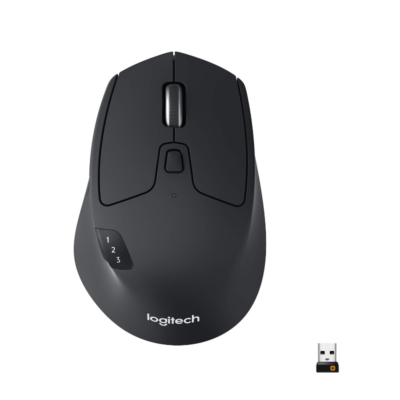
Compare Logitech Ergo M575 with Similar Products

Compare Logitech Ergo M575 specs, features and price with similar computer mice and alternatives.

Compare Logitech Ergo M575 with Similar Products
Selected Item
Logitech Ergo M575KSh 6,500Choose options

General

General specifications comparison
SpecificationLogitech Ergo M575Logitech M720 TriathlonLogitech Signature M650Logitech M650 L Left
BrandLogitechLogitechLogitechLogitech
ModelERGO M575M720 TriathlonSignature M650Signature M650 L Left
Announced2020201620222022
TypeWireless ergonomic trackball mouseMulti-device wireless mouseWireless productivity mouseLeft-handed wireless productivity mouse
ColorGraphite; Off-whiteBlackGraphite; Off-white; Rose; BlueGraphite

Sensor & Tracking

Sensor & Tracking specifications comparison
SpecificationLogitech Ergo M575Logitech M720 TriathlonLogitech Signature M650Logitech M650 L Left
Sensor TechnologyLogitech high-precision optical trackball sensorLogitech Advanced Optical TrackingLogitech Advanced Optical TrackingLogitech Advanced Optical Tracking
DPI380–4,000 DPI1000 DPI400–4,000 DPI400–4,000 DPI
DPI AdjustmentYes — via Logi Options+Yes — via Logi Options+Yes — via Logi Options+Yes — via Logi Options+
Polling Rate125 Hz via receiver; 88–133 Hz via BluetoothNot specifiedNot specifiedNot specified

Buttons & Scrolling

Buttons & Scrolling specifications comparison
SpecificationLogitech Ergo M575Logitech M720 TriathlonLogitech Signature M650Logitech M650 L Left
Number of Buttons5855
Programmable ButtonsYes — 3 customizable buttonsYes — 6 customizable buttonsYes — 2 customizable side buttonsYes — 2 customizable side buttons
Gesture ButtonN/AYesN/AN/A
Scroll WheelMechanical precision scroll wheelDual-mode hyper-fast tilt wheelSmartWheel line-by-line and fast scrollingSmartWheel line-by-line and fast scrolling
Horizontal ScrollNoYesNoNo
Thumb WheelN/AN/AN/AN/A
Button / Switch TypeMechanicalMechanicalSilentTouch mechanical switchesSilentTouch mechanical switches

Connectivity

Connectivity specifications comparison
SpecificationLogitech Ergo M575Logitech M720 TriathlonLogitech Signature M650Logitech M650 L Left
Connection TypeWirelessWirelessWirelessWireless
Wireless TechnologyBluetooth Low Energy; USB receiverBluetooth Low Energy; Logitech Unifying 2.4GHzBluetooth Low Energy; Logi BoltBluetooth Low Energy; Logi Bolt
BluetoothBluetooth Low Energy 5.0/5.1Bluetooth Low EnergyBluetooth Low EnergyBluetooth Low Energy
Wireless ReceiverUSB-A receiverUSB-A Logitech Unifying receiverUSB-A Logi Bolt receiverUSB-A Logi Bolt receiver
Wireless RangeUp to 10 mUp to 10 mUp to 10 mUp to 10 m
Multi-Device ConnectionNoYes — up to 3 devicesNoNo
Cable / ConnectorN/AN/AN/AN/A
Cable LengthN/AN/AN/AN/A

Battery & Power

Battery & Power specifications comparison
SpecificationLogitech Ergo M575Logitech M720 TriathlonLogitech Signature M650Logitech M650 L Left
Battery Type1 × AA battery1 × AA battery1 × AA battery1 × AA battery
Battery CapacityN/AN/AN/AN/A
Battery LifeUp to 18 months via receiver; up to 20 months via BluetoothUp to 24 monthsUp to 24 monthsUp to 24 months
Charging PortN/AN/AN/AN/A
Charging TimeN/AN/AN/AN/A
Fast ChargingN/AN/AN/AN/A
Wireless ChargingN/AN/AN/AN/A

Features

Features specifications comparison
SpecificationLogitech Ergo M575Logitech M720 TriathlonLogitech Signature M650Logitech M650 L Left
Customization SoftwareLogi Options+Logi Options+Logi Options+Logi Options+
Onboard MemoryNoNoNoNo
ProfilesApplication-specific software profilesApplication-specific software profilesApplication-specific software profilesApplication-specific software profiles
RGB LightingNoNoNoNo
Haptic FeedbackNoNoNoNo
Silent ClicksNoNoYes — SilentTouchYes — SilentTouch
Special FeaturesThumb-operated trackball; stationary space-saving design; adjustable pointer speedEasy-Switch; Logitech Flow; hyper-fast scrolling; gesture buttonSmartWheel; contoured shape; rubber side grips; customizable side buttonsLeft-handed design; SmartWheel; rubber side grip; customizable side buttons

Design

Design specifications comparison
SpecificationLogitech Ergo M575Logitech M720 TriathlonLogitech Signature M650Logitech M650 L Left
Dimensions134 × 100 × 48 mm115 × 74 × 45 mm107.19 × 61.8 × 37.8 mm118.9 × 65.6 × 41.5 mm
Weight145 g (with battery)135 g (with battery)101.2 g (with battery)111.2 g (with battery)
Hand OrientationRight-handedRight-handedRight-handedLeft-handed
Form FactorErgonomic trackballFull-size contoured mouseStandard contoured mouseLarge contoured mouse
Grip StylePalmPalmPalm / clawPalm
MaterialRecycled plasticPlastic with rubber gripRecycled plastic with rubber side gripsRecycled plastic with rubber side grip

System Requirements

System Requirements specifications comparison
SpecificationLogitech Ergo M575Logitech M720 TriathlonLogitech Signature M650Logitech M650 L Left
WindowsWindows 10, Windows 11 or laterWindows 10, Windows 11 or laterWindows 10, Windows 11 or laterWindows 10, Windows 11 or later
macOSmacOS 10.15 or latermacOS 10.10 or latermacOS 10.15 or latermacOS 10.15 or later
Other Operating SystemsiPadOS 13.4 or later; ChromeOS; LinuxChromeOS; Linux; iPadOS; AndroidChromeOS; Linux; iPadOS 13.4 or later; Android 5.0 or laterChromeOS; Linux; iPadOS 13.4 or later; Android 5.0 or later
Required Port / ConnectionUSB-A port or BluetoothUSB-A port or BluetoothUSB-A port or BluetoothUSB-A port or Bluetooth
SoftwareLogi Options+ (optional)Logi Options+ (optional)Logi Options+ (optional)Logi Options+ (optional)

What's in the Box

What's in the Box specifications comparison
SpecificationLogitech Ergo M575Logitech M720 TriathlonLogitech Signature M650Logitech M650 L Left
In the BoxERGO M575 trackball mouse, USB receiver, AA battery and user documentationM720 Triathlon mouse, Logitech Unifying receiver, AA battery and user documentationSignature M650 mouse, Logi Bolt USB receiver, AA battery and user documentationSignature M650 L Left mouse, Logi Bolt USB receiver, AA battery and user documentation

Specs

Logitech Ergo M575 specifications

General

Logitech Ergo M575 — General
BrandLogitech
ModelERGO M575
Announced2020
TypeWireless ergonomic trackball mouse
ColorGraphite; Off-white
Dimensions134 × 100 × 48 mm
Weight145 g (with battery)

Sensor & Tracking

Logitech Ergo M575 — Sensor & Tracking
Sensor TechnologyLogitech high-precision optical trackball sensor
DPI380–4,000 DPI
DPI AdjustmentYes — via Logi Options+
Tracking SpeedNot specified
AccelerationNot specified
Polling Rate125 Hz via receiver; 88–133 Hz via Bluetooth

Buttons & Scrolling

Logitech Ergo M575 — Buttons & Scrolling
Number of Buttons5
Programmable ButtonsYes — 3 customizable buttons
Gesture ButtonN/A
Scroll WheelMechanical precision scroll wheel
Horizontal ScrollNo
Thumb WheelN/A
Button / Switch TypeMechanical

Connectivity

Logitech Ergo M575 — Connectivity
Connection TypeWireless
Wireless TechnologyBluetooth Low Energy; USB receiver
BluetoothBluetooth Low Energy 5.0/5.1
Wireless ReceiverUSB-A receiver
Wireless RangeUp to 10 m
Multi-Device ConnectionNo
Cable / ConnectorN/A
Cable LengthN/A

Battery & Power

Logitech Ergo M575 — Battery & Power
Battery Type1 × AA battery
Battery CapacityN/A
Battery LifeUp to 18 months via receiver; up to 20 months via Bluetooth
Charging PortN/A
Charging TimeN/A
Fast ChargingN/A
Wireless ChargingN/A

Features

Logitech Ergo M575 — Features
Customization SoftwareLogi Options+
Onboard MemoryNo
ProfilesApplication-specific software profiles
RGB LightingNo
Haptic FeedbackNo
Silent ClicksNo
Special FeaturesThumb-operated trackball; stationary space-saving design; adjustable pointer speed

Design

Logitech Ergo M575 — Design
Hand OrientationRight-handed
Form FactorErgonomic trackball
Grip StylePalm
MaterialRecycled plastic

System Requirements

Logitech Ergo M575 — System Requirements
WindowsWindows 10, Windows 11 or later
macOSmacOS 10.15 or later
Other Operating SystemsiPadOS 13.4 or later; ChromeOS; Linux
Required Port / ConnectionUSB-A port or Bluetooth
SoftwareLogi Options+ (optional)

What's in the Box

Logitech Ergo M575 — What's in the Box
In the BoxERGO M575 trackball mouse, USB receiver, AA battery and user documentation

0 Reviews

No reviews yet

Be the first to review Logitech Ergo M575.

Write a review
Back to Top

My Cart